
One-Page Checkout
Take shoppers from cart to paid on one page.
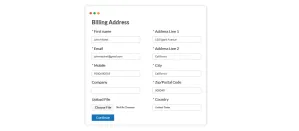
Address, shipping, payment and review sit together on one page, and shoppers fill in each section in order. Your server recalculates every total before the order is placed.

Faster Checkout
Fewer steps between the cart and a paid order.
Guest checkout and saved addresses cut down the typing, and the whole checkout sits on one page, so shoppers can see how close they are to finishing.
-
70%
Of shoppers abandon their cart before they finish buying.
Baymard Institute, 2025
-
25%
Have hit a checkout price that didn’t match the site.
University at Buffalo, 2025
One-Page Checkout
One-page checkout with guest buying, saved details and live totals.
Guest checkout, saved addresses and live shipping and tax updates share one screen, so shoppers see each step and the running total together.
-
Guest Checkout
Guests check out with an address and a payment method. There is no account to create and no verification email to confirm.
-
Saved Details for Returning Customers
Saved addresses fill in for returning customers, and a cart started as a guest merges into the customer’s account when they log in, with every item still in it.
-
Live Shipping and Tax
Change the country or the quantity, and the shipping rate, tax and order total update to match.
-
Totals Calculated on Your Server
Every price, rate, discount and total is recalculated on your server when the order is built, so each order carries the prices you set.
-
Terms and Conditions Checkbox
Require shoppers to tick a Terms and Conditions box before the order goes through. The box links to your own policy article.
-
Custom Checkout Fields
Add a field the built-in form lacks, such as a delivery note, a tax ID or a gate code, from the admin. It appears on checkout with no code to write.
-
What Ships Working in the Core
- Pay with: PayPal, cash on delivery, money order, bank transfer
- Ship with: standard rates and free shipping, scoped by region and order value
- Look like: your site, through either template family and its layout overrides
- Read in: any of the 22 languages that ship in core
-
Accessible Checkout
Every field has a label that stays visible while shoppers type. Error messages name the field they belong to, focus is always visible, and color is never the only signal. The target is WCAG 2.2 AA for the storefront and the admin.
Shape Your Checkout
Add gift wrap, shipping rules or address lookup to checkout.
Gift wrapping, product shipping rules and address suggestions each work inside the same one-page checkout. Select a marker to see the app and add it to your cart.




Going Further
Extensions add deposits, handling fees and live carrier rates.
Take a deposit on made-to-order work, add a handling fee, or quote a carrier’s live rate, all on the same checkout page.










-
100+ Payment Methods
Card gateways, wallets and bank debit. Each one adds its option to the same payment step.
-
Shipping Methods, Live Carrier Rates
Carrier extensions quote live rates in the shipping step, and some let you buy the label later from the order screen.
Put the whole checkout on one page.
Download J2Commerce 6 and start selling today.