
7 Scheduled Tasks
In core: Scheduled Tasks plugin
Abandoned carts, unpaid orders and old upload files get cleared on a schedule, so nobody on your team does it by hand.
Store Management
Orders, customers, taxes and reports all live in the Joomla admin you already know, with one login and one user list. Health checks name the exact setting that needs attention.

Everything Together
The order, its tracking number and its refund sit together in your Joomla admin, so you can answer a customer the moment they ask.
81%
Of retailers say clunky tech drains staff productivity.
Salesforce, 2025
16 hours
Lost every week by retail teams syncing data between systems.
Cin7, 2025
One Admin
Orders, products and customers use the same admin, search and permissions you already know.
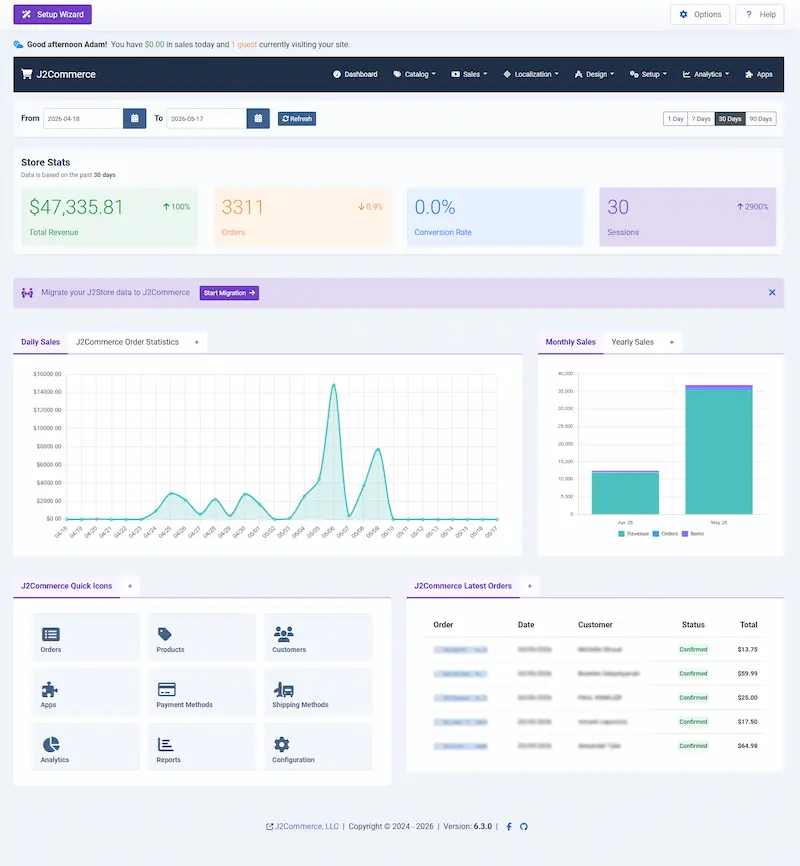
The dashboard, captured from a working store.
Line items, addresses, payment reference, shipping choice, status history, the emails that went out: all on the order. Orders, products, customers, taxes and reports are ordinary Joomla list screens, with Joomla’s own search, sorting, paging and access control.
Itemized sales tells you what the money did. Product performance tells you what is carrying your store and what is taking up shelf space. Both are built in, both filter by date.
The checks name the exact setting that needs attention, so your store is ready before a shopper reaches the payment step. A one-click test email confirms your host delivers your order confirmations.
Search, filter, sort, select several rows and act on all of them. Same keyboard path as the rest of the admin, and the same screen-reader labeling, because it is the same machinery.
Five providers keep your currencies current, and one of them, Frankfurter, needs no API key or account signup at all.
Restore your countries, zones, lengths and weights straight from the data the install shipped, with no rebuilding by hand.
Built In
Joomla’s scheduler, action log and report screens handle cleanup, audit trails and sales totals, and every one ships in the core package.
In core: Scheduled Tasks plugin
Abandoned carts, unpaid orders and old upload files get cleared on a schedule, so nobody on your team does it by hand.
In core: Action Log plugin
Every change to a product, coupon, tax rate or shipping method names who made it, so you always know who set each price.
In core: Itemized and Products reports
Today through last year, with CSV export, so your sales totals are ready without a spreadsheet.
Going Further
ShipStation hands off fulfillment and brings tracking back, and Quickbooks Payments lands card payments in your QuickBooks account.
Push orders to ShipStation automatically when they reach your chosen status, and get tracking numbers back in your store.
Export your products to a CSV file for backup, a store move or bulk edits in a spreadsheet, then import the changes back.
Card payments from your store land in your QuickBooks account, so you stop reconciling a separate gateway against your books.
Charge handling fees and surcharges at checkout with rules by geozone, user group or category, applied automatically or picked by the shopper.
Core ships two. Additional sales and product reports are listed separately.
See the Reports CategoryDownload J2Commerce 6 and start selling today.