

Stop Eating Costs That Belong on the Invoice
Every handling fee, environmental levy, and processing surcharge you are not collecting is margin you are donating. A conditional rules engine, four checkout positions, auto-apply or customer-selectable mode, and native tax integration — built for Joomla ecommerce.
Every Fee Tool You Actually Need
From flat handling charges to complex conditional surcharges, Additional Fees handles what your standard pricing cannot.
Order-Level Fees
One fee hits the entire cart — perfect for processing minimums, freight surcharges, or flat handling charges that don't scale with what's in the box.
Per-Item Multiplier
A $2 packaging fee on 20 units adds $40 automatically. The fee scales with cart quantity — you set the rate, the engine does the multiplication on every order.
Percentage Fees
A fee calculated as a percentage of the order subtotal — or subtotal plus shipping. Insurance riders, card surcharges, and high-value handling premiums grow proportionally with the order.
Geozone Targeting
A fee fires only when the shipping address falls within your selected geographic zones. EU environmental levies, state-specific surcharges, regional minimums — configured in dropdowns, enforced automatically.
User Group Rules
Wholesale accounts get fee-free handling. Retail customers pay the standard surcharge. One rule, no custom code, no manual exemptions. Group membership decides automatically at checkout.
Category Targeting
A dangerous goods surcharge only fires when the cart contains products from your hazardous materials category. No category match, no fee. Clean, automatic, correct.
Quantity & Price Range Rules
A minimum order processing fee activates only when the cart falls below your economical shipping threshold. A high-value handling surcharge kicks in only above $500. You set the window.
Auto-Apply or Customer-Selectable
Mandatory fees appear silently in the total. Optional services — gift wrapping, express handling — show as a customer-facing checkout step. Both modes built in. You pick the experience.
Tax-Aware Fees
Connect any fee to an existing tax profile. Tax resolves automatically by billing country and state using the same geozone rules your products already use. No separate tax table. No guessing.
Six Ways to Target the Right Customers
The rules engine evaluates six independent conditions on every cart. Each condition is optional — leave it blank and the fee applies to everyone. Fill it in and the fee applies only when it matches. Stack conditions together and the fee requires all of them to match. No programming required.
- Geographic zone — country, state, or any zone configuration you already have
- Specific registered users — for account-specific pricing agreements
- User group membership — wholesale vs. retail, B2B tiers, internal staff
- Product category — fee applies only when matching products are in cart
- Cart quantity range — fire within a minimum/maximum item count window
- Order price range — trigger only within a minimum/maximum subtotal window
Four Positions. Your Checkout. Your Call.
The fee step slides into your checkout flow at exactly the right moment. Gift wrapping belongs early, when the shopper is still deciding what the order should look like. A processing fee disclosure belongs right before confirmation, when financial expectations are already set. Place it where customers are most receptive — not where the template forces you.
- After billing information — early in the flow
- After shipping selection — once delivery method is set
- Before payment entry — clear disclosure before the card goes in
- Before order confirmation — final-moment transparency
Tax Integration That Follows the Law, Not the Guess
Fees can be taxable. Whether a handling charge is subject to sales tax depends on your jurisdiction, your customer's location, and the nature of the fee. Connect any fee to a J2Commerce tax profile and the applicable rate resolves automatically from the customer's billing address — the same geozone-based tax logic your products already use. No separate setup. No manual override. The tax is correct by default.
- Tie any fee to any existing tax profile in your store
- Tax resolves by billing country and state/province automatically
- Leave tax profile blank for tax-exempt fees — zero configuration required
Real-World Use Cases
Five scenarios where Additional Fees recovers real margin and solves real operational problems.
The Math Is Not Complicated
A $2 handling fee on 100 orders per month is $2,400 a year in recovered margin. Configure it once. Let the rules engine do the rest. Your accountant will notice before you do.
Translated In The Following Languages
Arabic Unitag (ar-AA), Chinese, Traditional (zh-TW), Danish (da-DK), Dutch (nl-NL), English (en-GB), English, USA (en-US), Finnish (fi-FI), French (fr-FR), German (de-DE), Greek (el-GR), Hebrew (he-IL), Italian (it-IT), Japanese (ja-JP), Norwegian Bokmål (nb-NO), Persian Farsi (fa-IR), Polish (pl-PL), Portuguese, Brazil (pt-BR), Portuguese, Portugal (pt-PT), Russian (ru-RU), Spanish (es-ES), Swedish (sv-SE), Turkish (tr-TR)
License Information
An active license entitles you to updates, downloads, and support for the duration of the license period. You may continue using this plugin indefinitely without an active license; however, support, updates, and downloads will not be available while your license is inactive.
- Developer J2Commerce
- Extension Type Apps
- J2Commerce Version 4.x, 6.x
- Joomla Version 4.x, 5.x, 6.x
 Arabic Unitag
 Chinese, Traditional
 Danish
 Dutch
Dutch English
 English, USA
 Finnish
 French
 German
 Greek
Greek Hebrew
 Italian
 Japanese
 Norwegian Bokmål
 Persian Farsi
 Polish
 Portuguese, Brazil
 Portuguese, Portugal
 Russian
 Spanish
 Swedish
 Turkish
Fix Save over AJAX now checks core.create for a new fee and core.edit for an existing one, matching the sibling controller methods (fixes #1495)
Fix The extrafee.* task dispatcher now accepts only the tasks the toolbar emits, instead of any method the controller happens to expose
Fix The admin AJAX handler requires the token in the request body; the variant search field no longer renders it into the URL
Fix The admin AJAX helper now sends array payloads such as an id list in full, instead of collapsing them into a single value
Fix Fix fatal "class not found" when adding an order-level fee — corrected UserMultiselectField class casing for case-sensitive (Linux) autoloading (fixes #331)
Improvement Toolbar Help buttons now link to the additional_fee documentation page
New Feature Initial J2Commerce 6 release — configurable extra fees at checkout
New Feature Fee conditions: order qty, price range, geozone, user group, category, variant
New Feature Dedicated checkout step plus inline Hook Mode injection (4 positions each)
New Feature Product-level fee overrides on the product edit form
New Feature Admin Fees CRUD using core Joomla 6 list layout and toolbar
New Feature Fixed and percentage fee types with optional tax class
New Feature Auto-apply mode and per-fee display-amount toggle
New Feature Bootstrap 5 and UIkit subtemplate variants
New Feature Full localization in 20 languages (en-US, en-GB, and 18 translated)
Improvement Native Joomla 6 MVC and namespaced extension (migrated from J2Store v4 FOF 2)
Improvement Vanilla ES6 checkout JS, no jQuery
Update Requires Joomla 6.x and J2Commerce 6.x
Fix Fix fatal "class not found" when adding an order-level fee — corrected UserMultiselectField class casing for case-sensitive (Linux) autoloading (fixes #331)
Improvement Toolbar Help buttons now link to the additional_fee documentation page
New Feature Initial J2Commerce 6 release — configurable extra fees at checkout
New Feature Fee conditions: order qty, price range, geozone, user group, category, variant
New Feature Dedicated checkout step plus inline Hook Mode injection (4 positions each)
New Feature Product-level fee overrides on the product edit form
New Feature Admin Fees CRUD using core Joomla 6 list layout and toolbar
New Feature Fixed and percentage fee types with optional tax class
New Feature Auto-apply mode and per-fee display-amount toggle
New Feature Bootstrap 5 and UIkit subtemplate variants
New Feature Full localization in 20 languages (en-US, en-GB, and 18 translated)
Improvement Native Joomla 6 MVC and namespaced extension (migrated from J2Store v4 FOF 2)
Improvement Vanilla ES6 checkout JS, no jQuery
Update Requires Joomla 6.x and J2Commerce 6.x
Deletion Remove non-functional product Apps-tab fee panel
Deletion Remove orphaned product-form XML + dead language strings
Update Requires Joomla 6.x and J2Commerce 6.x
Fix Casing fixed for type attribute of fields
Fix use type="Geozone" so the field loads on Linux
Fix Fix fatal "class not found" when adding an order-level fee — corrected UserMultiselectField class casing for case-sensitive (Linux) autoloading (fixes #331)
Improvement Toolbar Help buttons now link to the additional_fee documentation page
Improvement Minimum J2Commerce v6.3.4 required
Fix Fixed missing media/css folder on install
New Feature Initial J2Commerce 6 release — configurable extra fees at checkout
New Feature Fee conditions: order qty, price range, geozone, user group, category, variant
New Feature Dedicated checkout step plus inline Hook Mode injection (4 positions each)
New Feature Product-level fee overrides on the product edit form
New Feature Admin Fees CRUD using core Joomla 6 list layout and toolbar
New Feature Fixed and percentage fee types with optional tax class
New Feature Auto-apply mode and per-fee display-amount toggle
New Feature Bootstrap 5 and UIkit subtemplate variants
New Feature Full localization in 20 languages (en-US, en-GB, and 18 translated)
Improvement Native Joomla 6 MVC and namespaced extension (migrated from J2Store v4 FOF 2)
Improvement Vanilla ES6 checkout JS, no jQuery
Update Requires Joomla 6.x and J2Commerce 6.x
Fix Fixed settings won't save
Update J2Commerce v4 and Joomla 4/5 support
Improvement Added ability to display/hide price of fee during checkout
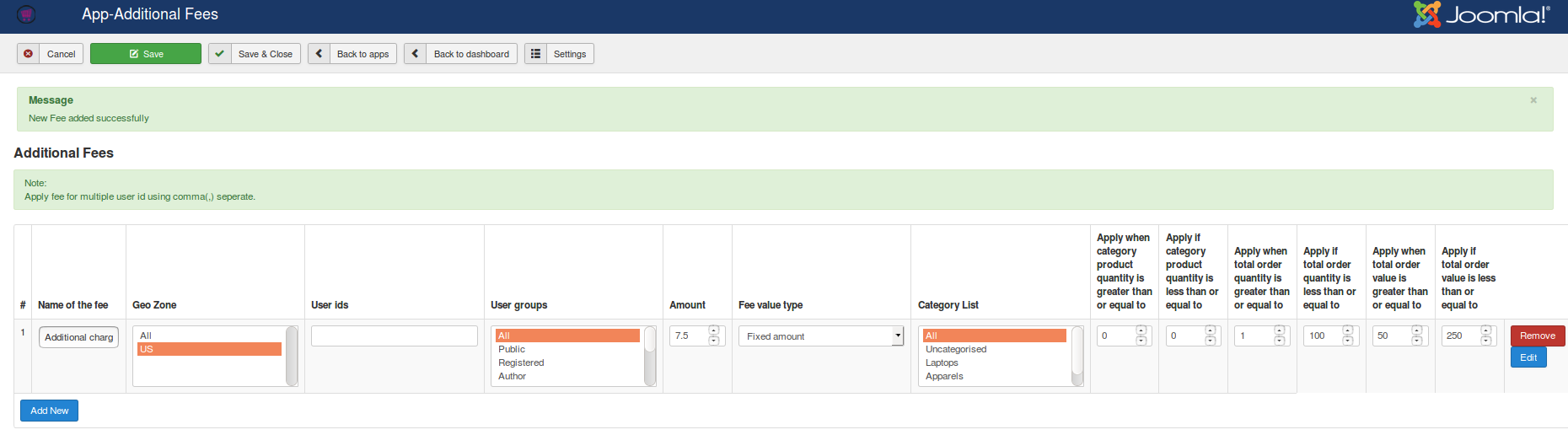
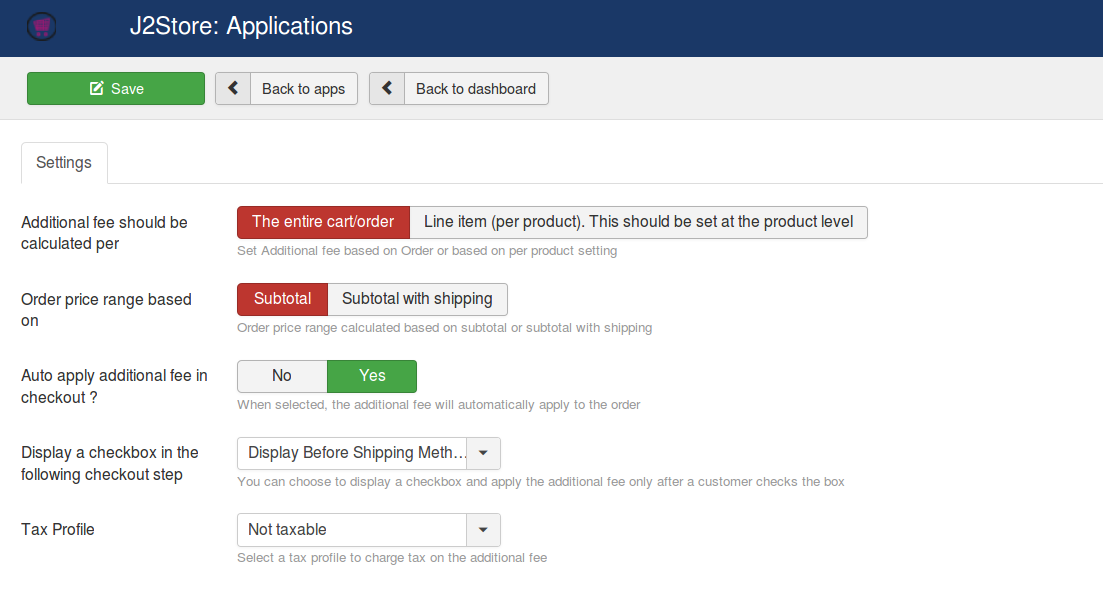
Collect additional / extra fee per order
Many times you might want to collect extra fees from the users apart from the conventional rates. Wondering how to make it possible?
Here comes the additional fees app with which you can receive an extra amount from users per order as well.
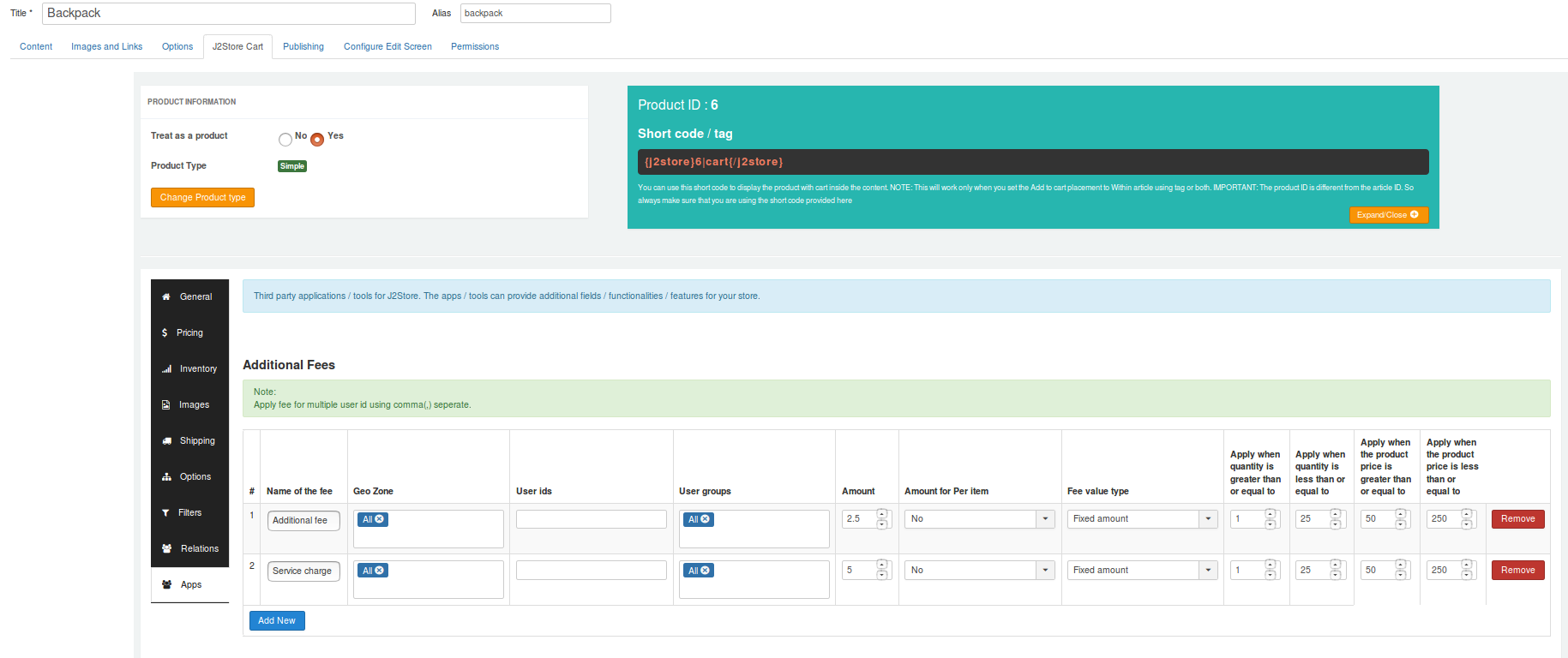
Product-specific additional fee
Your site may sell products that are hefty for which you may wish to set an extra cost apart from the normal shipping cost. This is possible with the features available in this app.
How? You can set product level additional fees.
Automatically apply the additional fee to the order
To make sure that the user pays the extra fee, this option comes handy. With this option, the extra fee set for the products will be applied automatically to the order.
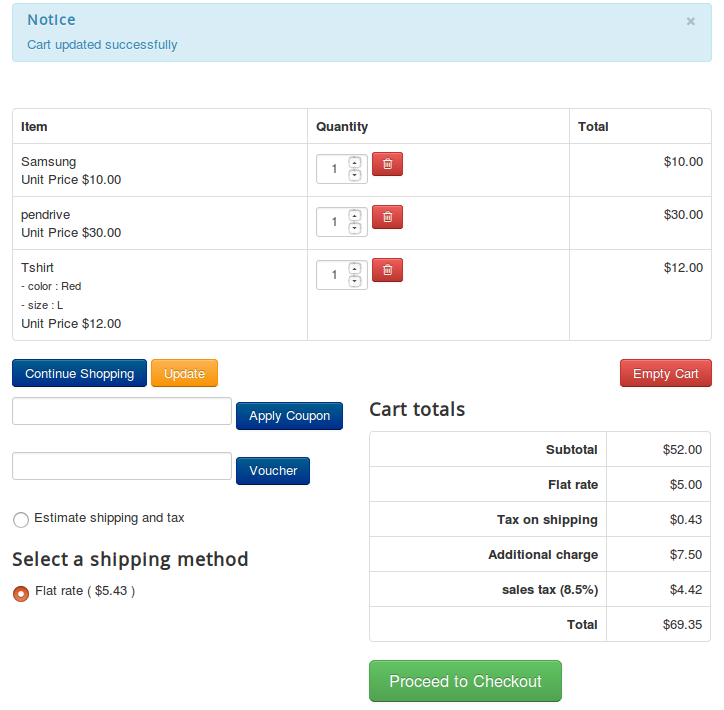
Create any number of additional fees to add to the order
For instance, let's suppose you wish to add a fee as a service charge as well as a processing fee.
Now, you can add as many additional fees to the products as you wish.
Offer customizations and charge extra
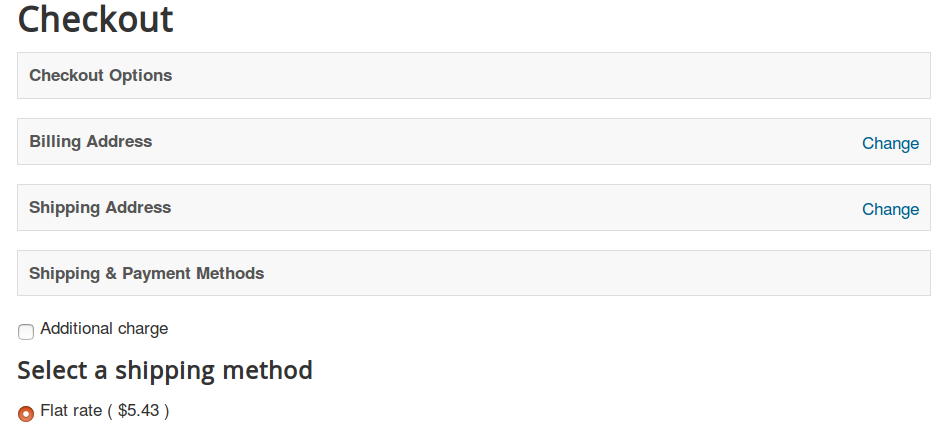
I am an online merchant and my stores sell paintings. I plan to sell general as well as customized paintings.
If the user wishes to buy normal paintings, then normal paintings, then the amount will be the default one. If the user wishes to make few customizations, then a processing fee will be added to the order.
The above scenario can be accomplished by setting to display a checkbox asking if they want any customizations to be done. If the user checks the checkbox, then the additional charge will be added.

Apply tax to the additional fee
If you wish to levy tax on the additional charge, that is also possible now.
Because the fee can be set to taxable or not-taxable.
Friendly interface to manage the fees
If you wish to levy tax on the additional charge, that is also possible now.
This app facilitates seamless management of the fee.
You may also be interested in these products


Stay Updated
Subscribe for free and be the first to know about the latest features, updates, and new additions.