

On the J2 Commerce Quick Icons Dashboard, there is no option for showing the link to the stock status (Inventory)
You have to access it from the menu
Is this in the pipeline, or can it be added?
Everybody will be able to see its contents. Do not include usernames, passwords or any other sensitive information.

On the J2 Commerce Quick Icons Dashboard, there is no option for showing the link to the stock status (Inventory)
You have to access it from the menu
Is this in the pipeline, or can it be added?

Gerald,
That was one of the first J2Commerce 6 elements we built so it doesn't really represent all of the other main line menu items in J2Commerce - I am working on updating it to include another 15 additional quick icons elemetns that can be toggled (and yes- I made sure Inventory was one of them).
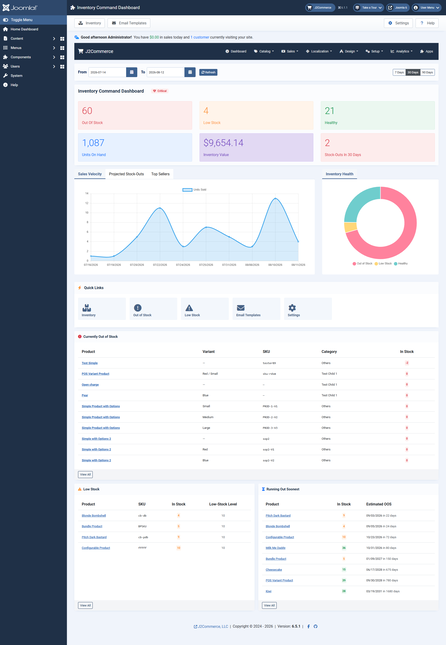
On another note, if inventory is a more primary element to the site - you may want to look at one of our newer releases Inventory Command
https://www.j2commerce.com/extensions/apps/inventory-command
This helps with forecasting, automated emails for out of stock items and almost out of stock items, etc...
here is a screenshot of the dashboard view for it:
Adam
Ok, I will look into the Inventory command app





