Skip to Content

New J2Commerce 6.6.5 is out. Here is everything in the release.

See What’s New
Account
Enter the email address on your account.
Forgot your username?
Enter your password.
Forgot your password?

Or continue with

Add one more sale after every checkout

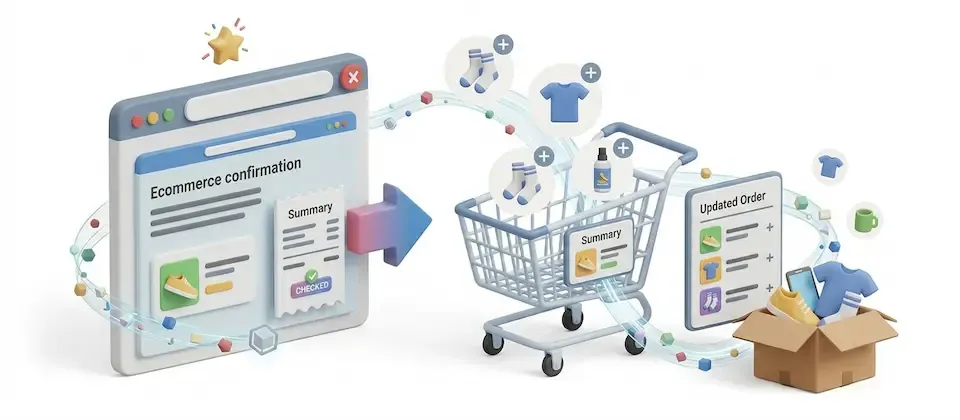
Show a targeted offer between payment and the confirmation page. The customer accepts with one tap, and the item is added to the order they just placed.

  • 8

    Targeting Conditions

  • 1

    Tap to Accept

  • 1

    Order, Not Two

  • 0

    Lines of Code to Build a Funnel

Build offers that appear right after payment

Choose who sees each offer, chain offers together and add accepted items to the original order.

  • One Tap, No Re-Checkout

    The offer appears between payment and confirmation, and one tap adds it without entering payment details again.

  • Charged to the Card Already on File

    Accepted offers are charged to the stored payment method from the original sale where the payment extension supports it. Offline orders can be amended and invoiced if you turn that on.

  • Merges Into the Same Order

    One order number, one shipment, one invoice. No duplicate order to reconcile, no second shipping charge, no confused customer.

  • Click-to-Build Visual Funnel

    Build each promotion on the Offer Flow canvas: a trigger, then an offer, then the next. Click "+" to add a step.

  • Eight-Condition Targeting Engine

    Cart contents, category, order total, customer group, first order, shipping/billing zone, language, stored card required, mix and match, every rule must match.

  • Exclusive or Stacked, Your Call

    Run one tightly-scoped promotion per order, or stack several by priority. A hard cap on offers per order keeps it from turning into a gauntlet.

  • Decline Routing

    If a customer declines an offer, show them a different one, such as a lower-priced version, instead of the next in line.

  • Shipping and Stock, Handled

    Waive shipping per offer or set a store-wide fallback. Out-of-stock offers auto-hide or show clearly disabled, your choice, either way nothing oversells.

  • Matches Your Storefront

    Offers use the same framework as your storefront, Bootstrap 5 or UIkit 3, so they match your checkout.

Offer More While the Customer Is Still at Checkout

The offer shows up between payment and confirmation, while trust is highest and the guard is down. One tap adds it, charged to the card already on file. No re-checkout, no second order to track down later. It lands in the exact same order the customer just placed, same shipment, same invoice.

  • Zero re-entry of payment details
  • Offline-paid orders can amend and invoice too
  • One order number for the original items and any extras
  • "Skip all offers" always one click away

Build Offer Sequences on a Visual Canvas

The Offer Flow builder lays your promotion out as a clean, auto-stacked sequence, trigger, offer, next offer, with a simple "+" to add a step. Every offer card carries its own quick menu for editing, copying, enabling, disabling, or deleting, and the whole sequence reorders right on the canvas.

  • Click "+" between steps to add the next offer
  • Per-offer menu: edit, copy, enable, disable, delete
  • Reorder offers without leaving the flow view
  • Scheduled promotions start and stop on their own

Show Each Offer to the Right Customers

Eight targeting conditions, cart contents, category, order total, customer group, first order, shipping or billing zone, language, and whether a stored card even exists to charge. Mix and match. Every single rule has to match before the offer shows. Show the phone case to the phone buyer, the warranty to the appliance buyer, and nothing irrelevant to anyone else.

  • Eight targeting condition types, combine freely
  • An offer shows only when every condition matches
  • Exclusive or Stacked promotion modes with priority
  • Tax recalculated on the accepted amount, every time

Launch with more today. Add a second sale to every order tomorrow.

Add After Sale Specials and show a relevant offer after every payment.

  • One Tap, No Re-Checkout
  • Charged to the Card Already on File
  • Merges Into the Same Order

Use Cases

Selling the Case, Not Just the Phone

Electronics Store

A phone retailer targets any order containing a specific phone model with a one-tap offer for the matching case and screen protector at a bundled discount. The offer shows the instant the phone purchase clears, no separate accessories page to remember, no second trip to checkout. One tap, charged to the card already on file, merged into the same order.

Selling Peace of Mind While It's Fresh

Appliance Dealer

A home appliance store targets orders over a set threshold with an extended-warranty offer, restricted to accounts with a stored payment credential so the accept path is always one tap. The moment right after buying a big-ticket appliance, while the "what if it breaks" thought is still fresh, turns out to be the best time anyone's ever going to ask about a warranty.

Turning a First Buy Into a Refill Habit

Consumables Brand

A coffee brand targets first-time buyers of its flagship bag with a discounted refill-pack offer, scheduled for a two-week launch window that auto-expires. New customers get a friendly nudge toward becoming repeat customers before they've even opened the box, no separate email campaign required.

Catching the Impulse Add

Gift Retailer

A gifts-and-home store targets every order during a holiday scheduling window with a flat-fee gift-wrap offer, shipping waived, quantity capped to the items in the cart. It's the kind of add nobody thinks to ask for until it's offered, and now it's offered automatically, on every order, with zero manual touch.

Bundling the Next Step

Online Course Seller

An education store targets customers who just bought its beginner course with an offer for the intermediate course at a launch discount, routed via decline branching to a lighter mini-course if they say no to the full bundle. One purchase turns into a learning path instead of a dead end.

Languages

Translated into 21 languages.

  • Arabic Unitag ar-AA
  • Chinese, Traditional zh-TW
  • Danish da-DK
  • Dutch nl-NL
  • English (United Kingdom) en-GB
  • English, USA en-US
  • Finnish fi-FI
  • French fr-FR
  • German de-DE
  • Greek el-GR
  • Hebrew he-IL
  • Italian it-IT
  • Japanese ja-JP
  • Norwegian Bokmål nb-NO
  • Polish pl-PL
  • Portuguese, Brazil pt-BR
  • Portuguese, Portugal pt-PT
  • Russian ru-RU
  • Spanish es-ES
  • Swedish sv-SE
  • Turkish tr-TR

Reviews

Customer Rating

No reviews yet

Every review comes from a licensed customer and appears exactly as written.

Write a Review

Log in to share your review.

Apps Works with J2Commerce 6

After Sale Specials

Offer a one-tap upsell on the thank-you page, charged to the card already on file and merged into the order the customer just placed.

Billing Option
$29.00
Every year

Item added to cart. Checkout

View Wishlist
  • Updates, downloads and support for the length of the license
  • Your plugin keeps working after the license ends, and renewing brings new updates
  • A step-by-step user guide for every setting, linked below

Joomla
Joomla 6
J2Commerce
J2Commerce 6

You May Also Like

Advanced Cart

Apps J2Commerce

Give shoppers a slide-out cart drawer with a free shipping progress bar and inline coupons, so they never leave the page to see their cart.

Omnisend

Apps J2Commerce

Paste one Omnisend API key to start recovering abandoned carts and tracking order events in your Omnisend account.

After Sale Surveys

Apps J2Commerce

Ask targeted questions on the order confirmation page, right after customers pay, and review the answers in an analytics dashboard.

ActiveCampaign

Apps J2Commerce

Hand abandoned carts and order history to ActiveCampaign, so your automations can follow up with shoppers who almost bought.

Frequently Asked Questions

THis is the answer for question #1