


J2Commerce 6.6.6 brings shoppers back to the carts they left and shows each customer only the product combinations you actually sell. It also gives every product an image before its photos arrive, and it includes a security fix, so we recommend updating every store.
Key Takeaways
- Cart reminder emails bring shoppers back to the items they left in their cart.
- Product options can depend on an earlier choice, so shoppers only see combinations you sell.
- A Default Product Image and store-wide image shapes keep your catalog looking consistent.
- J2Commerce 6.6.6 includes a security fix, so update every store.
Update Today: Security Fix Included
Important
J2Commerce 6.6.6 includes a fix for a security issue tracked as CVE-2026-102803. Updating to 6.6.6 applies the fix, and you don't need to change anything else.
Bring Shoppers Back to the Carts They Left
Cart reminder emails reach shoppers who added items and left without checking out. Each email lists what they left behind with a button straight back to their saved cart, and every message carries a one-click unsubscribe link. The reminder uses the new Marketing email type, so you edit it in Email Templates like any other J2Commerce email.
Cart reminders are off until you switch them on:
- Turn on Cart Reminder Emails. Open J2Commerce Options, go to the Emails tab and set Cart Reminder Emails to Yes.
- Choose when the reminder goes out. Set Send Reminder After and pick hours or days as the Delay Unit.
- Add the scheduled task. In System, Scheduled Tasks, create a J2Commerce: Send Cart Reminders task and run it at least hourly.
Show Only the Options That Fit
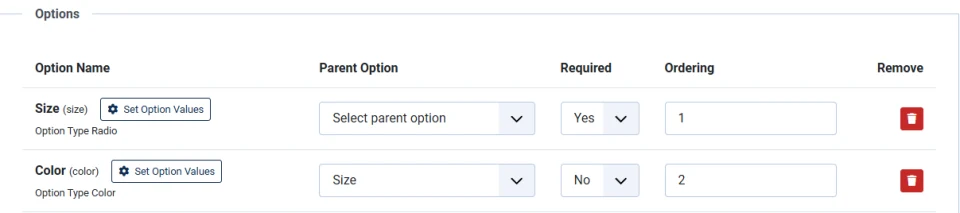
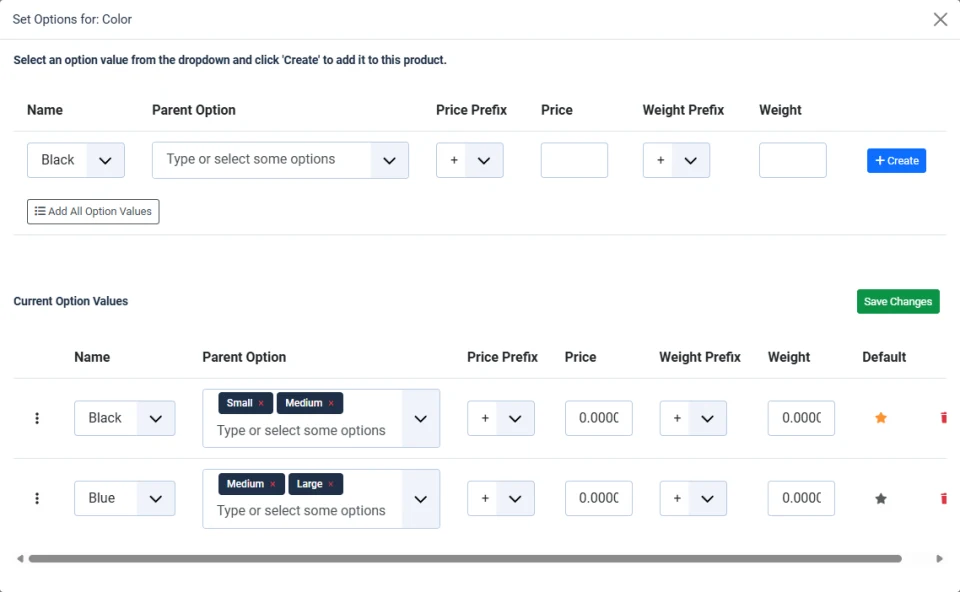
Product options can now depend on an earlier choice. Make Size the parent of Color, then pick which colors belong to each size: Black for Small and Medium, Blue for Medium and Large. Shoppers only see combinations you can ship, so you get fewer wrong orders and fewer "is this available?" emails.
Give Every Product an Image
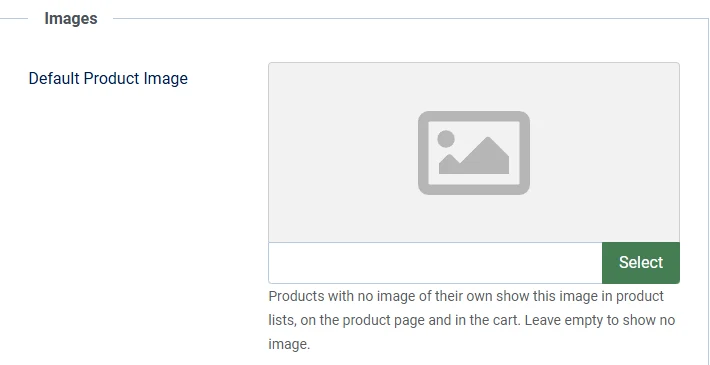
Choose one Default Product Image, and every product without a photo of its own shows it in product lists, on the product page and in the cart. Your category pages stay complete while new product photography is on its way.
Keep Product Images the Same Shape Across the Store
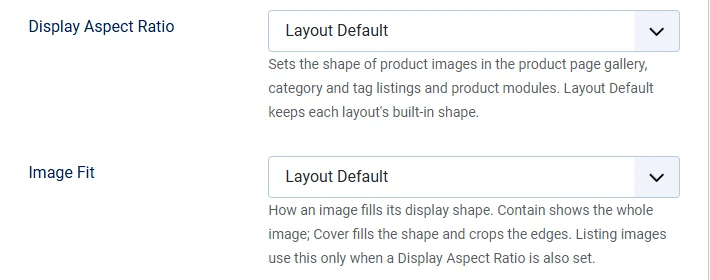
Display Aspect Ratio and Image Fit set the shape of product images in the product page gallery, category and tag listings and product modules. Pick Cover to fill every frame or Contain to show the whole product, and your product grids line up no matter what size photos you upload.
More New Features
Refund Options Right Where You Refund
The order refund window can now show extra choices from installed apps, such as canceling the subscription the refunded order paid for.
Address Forms Your Customers Recognize
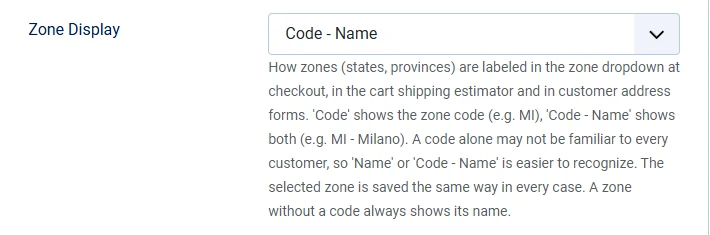
Zone dropdowns can show the zone code next to the name, such as "MI - Milano," for customers who know their state or province by its abbreviation. Checkout menu items can also show or hide the logout link.
Another Source for Exchange Rates
The Currency Updater can now take its rates from AllRatesToday, an optional provider you can choose in the plugin settings.
Manage Your Catalog From Other Systems
The J2Commerce API can now create and edit every product type, including prices, images and extra fields, and a new endpoint reads product filters. Your ERP, inventory system or marketplace feed can keep the catalog current without anyone copying product data by hand.
Checkout and Cart
- Shipping tax is counted once in payment surcharges, and surcharges that already include tax are no longer taxed a second time, so customers pay the correct total.
- When a coupon can't be used on the final order, the cart tells the shopper instead of showing it as applied.
- Gift vouchers without an expiration date now work as expected.
- Checkout is easier to complete with a keyboard or screen reader in both template families, and the confirm step is simpler.
- Guests can open their order from the emailed link, the same way logged-in customers view theirs.
- Shoppers whose account needs email activation keep the address they entered and return to the right checkout step.
- The mini-cart stays visible when Hide When Empty is off, and it refreshes more reliably.
PayPal and Payments
PayPal got a lot of attention this cycle, so the amount you charge and the order status you see match what PayPal recorded.
- PayPal charges match your cart exactly, including option prices, fees and currency conversion.
- Orders are confirmed when PayPal settles the capture, not when the shopper finishes checkout.
- New subscriptions run on PayPal's current API, and you can refund subscription payments.
- If a subscription approval is interrupted, the store finishes setting up the subscription on its own.
- Existing PayPal billing agreements keep renewing.
- When a renewal payment is declined, you see the reason PayPal gave.
- PayPal subscriptions can renew on a date your subscription app sets, and carts show discounted line prices beside the original price.
Also Fixed and Polished
- Flexible Variant products with many variants and options now load quickly.
- Gift card balances update correctly when an order's status changes.
- A product's Stock Status stays as you set it, while sold counts keep updating.
- Digital downloads work from every media directory you've configured, not only the images folder.
- Your support team can correct the email address on a registered customer's order from the order screen.
Update to J2Commerce 6.6.6
Update from System, Update, Extensions in your Joomla administrator. Thank you for running your store on J2Commerce. If you run into anything, or have an idea for what we should build next, get in touch with our team.