#401 Options for Downloadbles

Posted in ‘Technical Support / Bugs’
This is a public ticket

Everybody will be able to see its contents. Do not include usernames, passwords or any other sensitive information.

Latest post by Adam Melcher on Saturday, 02 August 2025 17:38 UTC

Chris Elliott

Hi Adam

I have followed the guide to ensure Options are accessible for Downloads. It works on one site but no. this one!

This one stubbornly refuses to show the defined option.

Go here: https://lukemachin.com/soulshine Look ONLY at the CD + Digital Download product 

This one needs a downloadable so I set it as a Download product. It also is a CD (as part of the package) so I added an Option to choose shipping location. (You'll see this for neighbouring simple products).

The items are displayed as a Category Blog (using the {j2store}XX|cart{/j2store} shortcodes.

When using article blogs, there's no Chooser for the bootstrap but I know for sure that the site (Helix Ultimate based) is using Bootstrap 5. So I created /templates/shaper_strings/html/com_j2store/templates/bootstrap5/view_downloadable.php and added the options code to it.

I've offered an SU login  - can you see where I am going wrong?

Chris

Chris Elliott

Just an addendum to say that if I set the menu item to load J2Store > Product List, options are still not loading on the selected item (CD & Download).

Chris Elliott

Further information...

Using J2C 4.0.16 on Joomla 5.3.2

The downlaodable item CD + Digital Download does not have the code to show the Options even though its had tge code added to the template file to do so. I have. double and triple checked!

In addition, I note that as well as the Options not been visible in the front end, the Add to Cart is ineffective for this product - other SIMPLE products are ok. On click, the cart is not updated so something is a tad broken here!

Help!

C

Olivier

Can you send the login information of the site where it is working? So we can figure out the differences between the 2?

The ticket is private so you can safely do so.

Thank you!

Olivier.

Growing Together

Help us get back to #1 in the Joomla Extension Directory by leaving us a 5-Star review here.

Chris Elliott

Hi there, Olivier.

Thanks for your feedback. Sure - happy to do that.

You'll see this working on this page https://solsticeprog.uk/solstore Where you'll notice an item labelled "Clan Live: The Colchester Gathering". This is a downloadable product, but you'll see that it has an option there for people who would like to add more to the pay price.

If you take a look at item article 194 on this site, you can inspect its J2Store settings and compare them with those used on the faulty, problematic https://lukemachin.com/soulshine page.

Do let me know if you need any additional information to help you diagnose this problem.

Best wishes, Chris.


Chris Elliott

Hi

i see you logged into Luke's site yesterday... did you find anything interesting?

C

Adam Melcher

Chris,


I just enabled the J2Commerce products page :
https://lukemachin.com/soulshine-pre

I set it for superuser access so you can see it first - I also saw no front-end login/account link so I enabled shared sessions in the global config so after you log in to the back-end of the site, click the link above to view the options in the category view for both downloadable and simple product types.

The two that are missing don't currently have any options set for those products. 

Also, for products category view (for reference) files that begin with default_ are related to category level product displays and files that begin with view_ handle the individual product display views. I didn't touch any of the files though as it seems to working in the J2 menu item. Did I totally miss the issue or is this what you were trying to do?


Adam

Growing Together

Help us get back to #1 in the Joomla Extension Directory by leaving us a 5-Star review here.

Chris Elliott

I think the issue is that I was using Article : Category Blog view to show the products (using the short code). I like your result using Product Cat view. 

I recall there was a reason I didn't do this originally but I can't remember why.

let me revisit on Monday - your /soulshine-pre page is doing the job nicely whereas my /soulshine page shows the same but the options are not seen.

does this clafrify my original problem?

Chris

Adam Melcher

Chris,


I usually only build my stores using the J2 Products or Tags Views, but if I were using a page builder system, I can see the need for additional customizations using the shortcodes. Let me see if I can add another page to the documentation showing how to use layout overrides on the short code displays...


Adam

Growing Together

Help us get back to #1 in the Joomla Extension Directory by leaving us a 5-Star review here.

Adam Melcher

Chris,

I removed the super user creds you posted in the the earlier post as I am going to make this public so others can learn from this as well.


Here is the secret sauce to using the template layout override system to customize how the product elements appear in your article views when you are using the shortcodes:

Step 1: Inside your templates' html folder (same place you have already added the com_j2store override file) you are going to create a new folder titled product (singular)

so your folder structure should look similar to this:
templates/shaper_strings/html/com_j2store/product

Step 2: You can either copy all of the files or just the one you need from:
components/com_j2store/views/product/tmpl

and paste into your new product folder here:
templates/shaper_strings/html/com_j2store/product

The files should all have the item prefix. These are the files that the shortcode uses to display the products on your article pages.

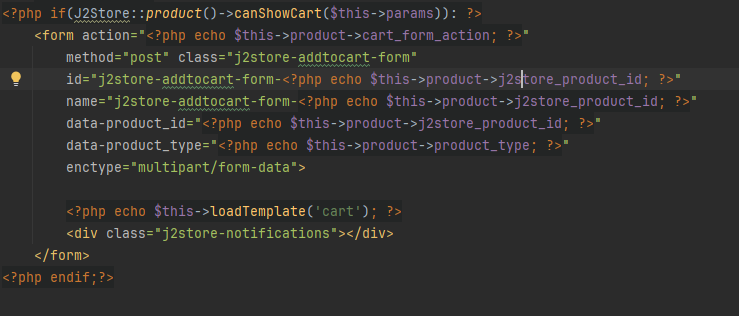
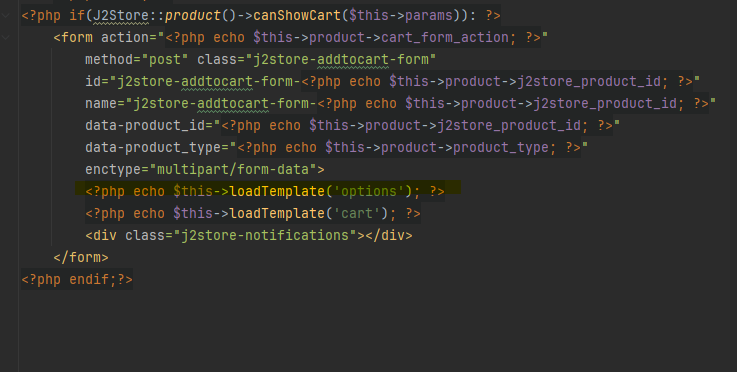
Step 3: Inside the item_downloadable.php file found here:
templates/shaper_strings/html/com_j2store/product/item_downloadable.php

look towards the bottom of the file for something that looks like this :


Screenshot 2025 08 02 123534 2

and add the yellow highlighted item above the $this->loadTemplate('cart'); as shown below.

Screenshot 2025 08 02 123220


This now gives you the best of both worlds - you can customize these item views to fit your your current project and in your case - now display the options fields for downloadable products using the shortcodes.

the products view looks fine, but your article caegory blog view fits the template better in my opinion.

I am going to close this ticket, but if you run into any other issues, you know how to find us :)

Adam


Growing Together

Help us get back to #1 in the Joomla Extension Directory by leaving us a 5-Star review here.

Stay Updated

Subscribe for free and be the first to know about the latest features, updates, and new additions.