#399 Moving the description

Posted in ‘Technical Support / Bugs’
This is a public ticket

Everybody will be able to see its contents. Do not include usernames, passwords or any other sensitive information.

Latest post by Adam Melcher on Sunday, 27 July 2025 15:25 UTC

Nevs Meeb

Hi There,

I'm trying to move the description to below the price section, as described here:

https://docs.j2commerce.com/j2commerce/troubleshooting-guide/moving-the-description

This used to work in J2store, but the paths given do not seem to be accurate.

Are these instructions still correct?

Hopefully, it's possible to get some help with this.

Olivier

Hello Nevs,

thank you for reporting these issues in the documentation. We are actively updating it but there are pages that still need some updates.

The page you mentioned has indeed wrong paths and it must have been the case way before we even took over the project.

The files mentionned should be found under:

/plugins/j2store/app_[the name of the app]/app_[the name of the app]/tmpl/[the name of the app]

The app name is the name of the app used for theming, for instance, most likely bootstrap5 under Joomla 4/5.

Give it a try and let me know how it is working out :-)

Olivier.

Growing Together

Help us get back to #1 in the Joomla Extension Directory by leaving us a 5-Star review here.

Nevs Meeb

Hi Olivier,

Thanks for your quick reply.

I did find the file in bootstrap 5, but I'm not sure where to place the file as mentioned here:

Navigate to “/templates/your site’s template/html/com__j2store/templates/your site’s sub-template/” and paste the file “view__simple.php”.

There is no "/templates/your site’s template/html/com__j2store" in my files.

Any suggestions on where to place the file?

Adam Melcher

Nevs,

If there is no directory in your template's html folder, then you would need to create it. 
If your template's name is nev_template for instance:
/templates/nev_template/html/
then simply create the following folders inside the html folder:
com_j2store - then inside com_j2store add a templates directory

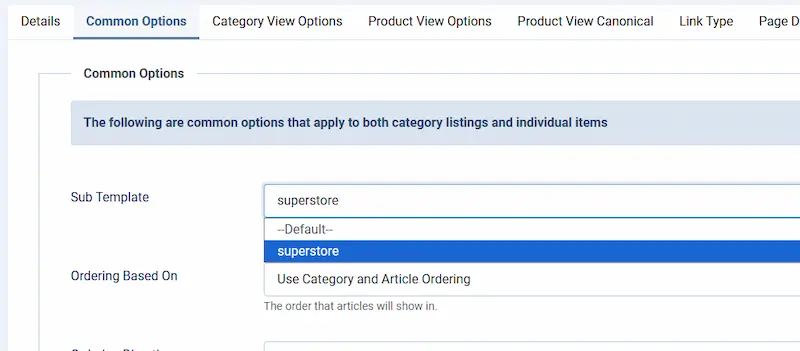
then inside the templates directory add the file name of the template that is being used in the category view found here:


subtemplate view


If you have Bootstrap 5 selected in your menu sub-template setting - then the plugin folder name would be app_bootstrap5 so you would remove the app_ and the folder you would create inside the templates directory would be bootstrap5 

the full path you would have using the settings I mentioned above would be :
/templates/nev_template/html/com_j2store/templates/bootstrap5

or if using the sub template shown in the image above it would be:
/templates/nev_template/html/com_j2store/templates/superstore

then you would simply add and of the subtemplate overrides you have into that folder such as view_simple so the final path where that file should be is:
/templates/nev_template/html/com_j2store/templates/bootstrap5/view_simple.php

If you are bringing over files from a bootstrap 3 layout from Joomla 3 for instance - I would strongly recommend that you bring over you changes from the old file into the new one (instead of just dropping it in the folder "as is" - because J2Store 4 uses the latest Bootstrap 5.3+ while J2store 3 used either Bootstrap 2 or 3. 

Adam


Growing Together

Help us get back to #1 in the Joomla Extension Directory by leaving us a 5-Star review here.

Stay Updated

Subscribe for free and be the first to know about the latest features, updates, and new additions.