#384 Stuck at Shipping Address on Checkout

Posted in ‘Technical Support / Bugs’
This is a public ticket

Everybody will be able to see its contents. Do not include usernames, passwords or any other sensitive information.

Latest post by Adam Melcher on Wednesday, 16 July 2025 19:42 UTC

Michael Weber

Client reports being unable to proceed past Shipping on checkout.


Doesn't work with existing nor new address

What can I check or change to fix this?


NOTE: working with SD at Danico Digital 

Adam Melcher

Michael,

I just started a test checkout on the site, and I should have checked the plugin settings first, but it looks like the Client Key and Client Secret fields are empty. These are both required with the new UPS API. You can find exact instructions on obtaining these credentials from your client's UPS account here:
https://docs.j2commerce.com/j2commerce/shipping-methods/ups-shipping#how-to-obtain-ups-oauth-credentials


Let me know if you run into any other issues.


Adam

Growing Together

Help us get back to #1 in the Joomla Extension Directory by leaving us a 5-Star review here.

Michael Weber

Updated the UPS shipping settings and still unable to checkout. 

What can we try next?

Adam Melcher

Michael,

It appears that you are still experiencing issues with the API key. Can you double-check the values you entered in the UPS plugin against the UPS account and ensure there are no spaces? The current API Key doesn't appear to be normal (there should be no spaces in the key).


Adam

Growing Together

Help us get back to #1 in the Joomla Extension Directory by leaving us a 5-Star review here.

Michael Weber

the key was provided via PDF and the cut/paste caused the error

updated the key and still no joy

Michael Weber

the key was provided via PDF and the cut/paste caused the error

updated the key and still no joy

Michael Weber

key

Adam Melcher

Michael,

The error: 0 Call to a member function getAccessToken() on null still persists.  This indicates an issue with the API key itself. Did you set this up according to the instructions in the documentation, or did your client set it up and send you the necessary information?

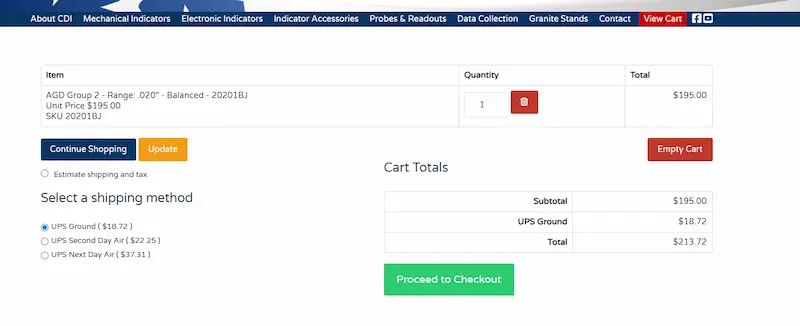
Using another live UPS account's credentials on the site confirms that the plugin itself works fine; the issue lies with the API key, either incorrect keys or improper permissions not set in the UPS developers portal.


dialindicator ups working


Growing Together

Help us get back to #1 in the Joomla Extension Directory by leaving us a 5-Star review here.

Michael Weber

Client provided key/secret in a PDF.  Have request key/secret info another way and to check permissions 

Adam Melcher

If the client can provide you with temporary access to the UPS.com account and you follow the instructions in the documentation above, you should be able to complete this task in no time at all. 

I will keep this ticket open to ensure you can get it working. Please keep me updated on the progress.


Adam

Growing Together

Help us get back to #1 in the Joomla Extension Directory by leaving us a 5-Star review here.

Michael Weber

Thanks for your support and patience.

Client provided key/secret in email (instead of pdf) and checked permissions on UPS.

It works now.

Adam Melcher

Glad to help. I will close this ticket and make it public so that others can learn from this experience as well. 


Adam

Growing Together

Help us get back to #1 in the Joomla Extension Directory by leaving us a 5-Star review here.

Stay Updated

Subscribe for free and be the first to know about the latest features, updates, and new additions.