#170 Shipping & Payment Not Showing

Posted in ‘Technical Support / Bugs’
This is a public ticket

Everybody will be able to see its contents. Do not include usernames, passwords or any other sensitive information.

Latest post by Adam Melcher on Thursday, 06 March 2025 14:21 UTC

Michael Martin

Hello.

It seems like overnight, the option for shipping is no longer available in the cart nor is the Stripe Payment option, even though they are both enabled and were working yesterday. Since there is no shipping viewable to select, the cart will not allow the order to be processed without shipping being selected. We've disabled and enabled both options, even tried creating a new shipping option but it is still not viewable in the checkout option of the cart. See attached,

Not sure what to do.

Thanks.

Michael Martin - Military Tribute Banners

www.militarytributebanners.org

Adam Melcher

Michael,

Can you update your administrator info on this ticket so I can log in and take a look? 

Adam


Growing Together

Help us get back to #1 in the Joomla Extension Directory by leaving us a 5-Star review here.

Michael Martin

Sure thing. It looks like it's only occuring in the guest mode. So I currently disabled it. As a registered user, they both appear.

I will send you the login via email.


Thanks


Michael Martin

Just sent the login credentials to support@j2commerce.com

Michael Martin

Hello.

It seems this morning that the options are no longer showing with logged in users as well.

System Task
System Task
The ticket information has been edited by Michael Martin (michaelm@militarytributebanners.com).

Michael Martin

Hello again.

The free shipping plugin is viewable. However, the standard shipping methods is not working. The same seems to be with the payment. I added the Stripe plugin and it shows, however, the Stripe Checkout is not showing in the checkout proceedure.

Thanks for the help.

Michael Martin

They seem to be working again right now. Not sure if you all did something to fix it or it came up on its own. We will keep an eye out on it.

Adam Melcher

Michael,


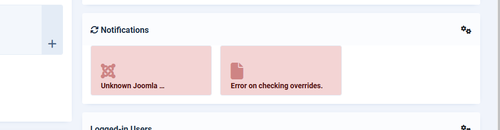
I wish I could take credit for it, but it appears you may have an issue with your server and probably will need to reset it as I can't see everything with the current access level I have but the first clue something isn't right is on the home dashboard (see attached image):
Screenshot 2025 03 06 081407

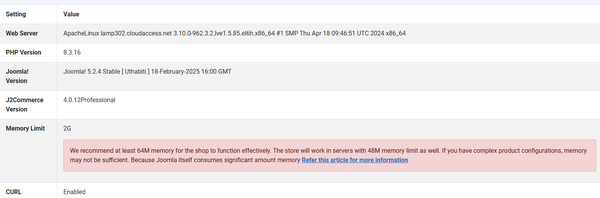
Opening the diagnostics app under J2Commerce also helps show if there is any setting that should be looked at and this is what I see in there as well:

Screenshot 2025 03 06 081904

I believe the combination of restarting the server and increasing the memory limit should resolve your issue, but if it still persists, please grant me super user access so I can view the rest of the site info that can help me assist you better.


Adam

Growing Together

Help us get back to #1 in the Joomla Extension Directory by leaving us a 5-Star review here.

Stay Updated

Subscribe for free and be the first to know about the latest features, updates, and new additions.