Skip to Content

New J2Commerce 6.6.5 is out. Here is everything in the release.

See What’s New
Account
Enter the email address on your account.
Forgot your username?
Enter your password.
Forgot your password?

Or continue with

Closed Public Category: Customer Service Ticket #119

Zone / Regio an Language

This is a public ticket

Everybody will be able to see its contents. Do not include usernames, passwords or any other sensitive information.

Conversation

Sabrina BRAND

Hello,

I configured my whole joomla website with j2 store.

It looks great but I have 2 problems :

- The first one, I did set country to "France, Metropolitan" and activated all the "France, Metropolitan" zones.

I desactivated and erased all other zones.

And I enabled a Geozone for "France, Metropolitan".

On checkout no zone/Region can be selected, so people can't go further to buy?

How to procede? 

- The second one, my website is French, we only sell in France.  How do I change J2store language to have French frondend in stead of English?
  I did find your documentation about that, I did create Transifex account and asked to join your FR group, but I had no respons to that.


Kind regards,

Sabrina Brand

Brand Conception

www.brand-conception.fr

Attachments

checkout.jpg
Olivier Buisard Staff

Sabrina,

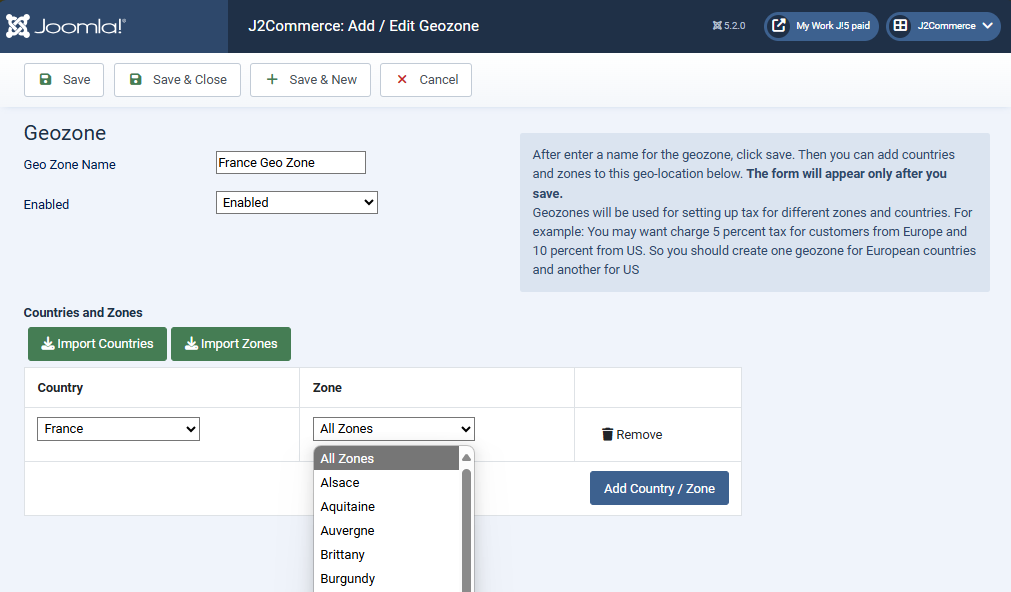
in your geozone settings, you should see the zones below the 'All zones' option. If you don't, there will not be any option in the checkout dropdown.

Do you see those zones?

geozone.jpeg

Olivier.

Sabrina BRAND

Hi Olivier,

Thanks for your reply.
Yes I do see and have activated "All Zones".  In my case the country is "France, Metropolitan" but that shouldn't be the problem.

Kind regards,

Sabrina

Sabrina BRAND

Hi again,

Otherwise is there a way to make the "Zone/Region" field not mandatory ?


Regarding the language translation, as they are not a zip file to install as extension,

are these the right paths to place them? (I'm sorry, I'm no professional websitebuilder)

My website > public_html > administrator > language > fr-FR

(for_use_j2store3_site_com_j2store_fr_FR.ini)

My website > public_html > templates > my template > language > fr-FR

(for_use_j2store3_admin_com_j2store_fr_FR.ini)


Kind regards,

Sabrina

Olivier Buisard Staff

Hello Sabrina,

of course, no problem:

  • the admin language file must renamed to fr-FR.com_j2store.ini and be placed in administrator > language > fr-FR.
  • the site file must also be renamed fr-FR.com_j2store.ini and be placed in language > fr-FR.

To make the field 'not required', go to setup -> custom fields and edit zone_id. You could also disable the field altogether.

Oh and make sure you have created a menu item for checkout, another user had the same issue and it solved it.

Olivier.

Sabrina BRAND

Hi,

I followed all of your steps and everything is working fine now.

Thanks a lot !

Olivier Buisard Staff

Wonderful, Sabrina! Glad to help :-)

Olivier.