

Stop Juggling Three Carrier Portals. Seriously.
One API key. USPS, UPS, FedEx, and DHL — all quoting live rates at your checkout, all generating labels from your J2Commerce admin, all posting tracking numbers automatically. Your fulfillment workflow just got a lot shorter.
Every Major Carrier. One Joomla Plugin.
Real rates at checkout, labels from your admin panel, tracking that updates itself. This is what shipping looks like when it actually works.
Live Carrier Rates at Checkout
Real USPS, UPS, FedEx, and DHL quotes appear the moment your customer enters a shipping address. No flat-rate dart-throwing. No margin bleed. The customer pays what it actually costs — carrier logos and all.
Delivery Time Estimates
Display estimated business days next to every shipping option. "3 Business Days" or "1 Business Day" — your customer picks the service that fits their timeline, not just the cheapest option.
Service Discovery Tool
Click one button and see every service your carrier accounts actually support. Check off the ones you want. The rest stay off the checkout page. Clean options for your customer. Control for you.
One-Click Label Creation
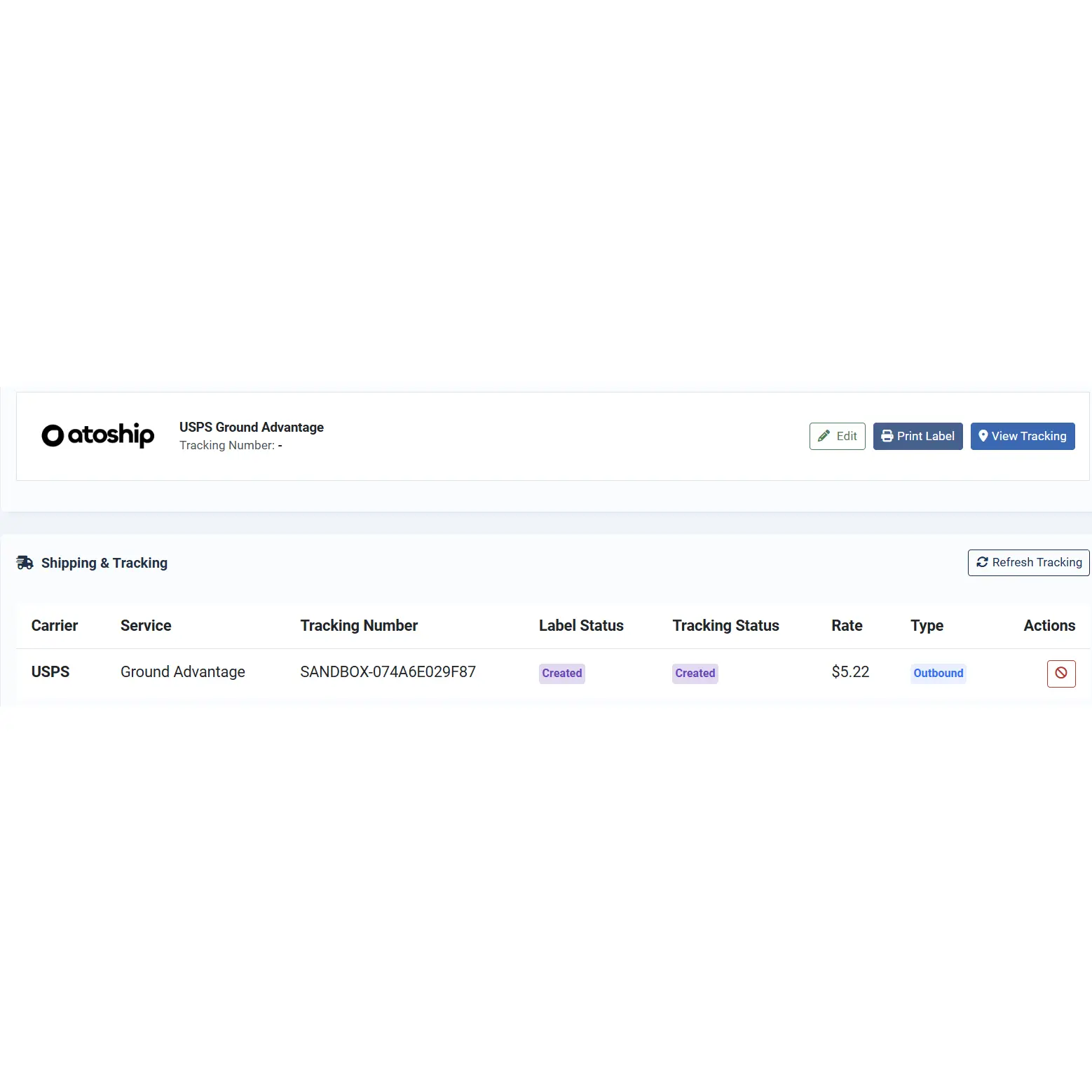
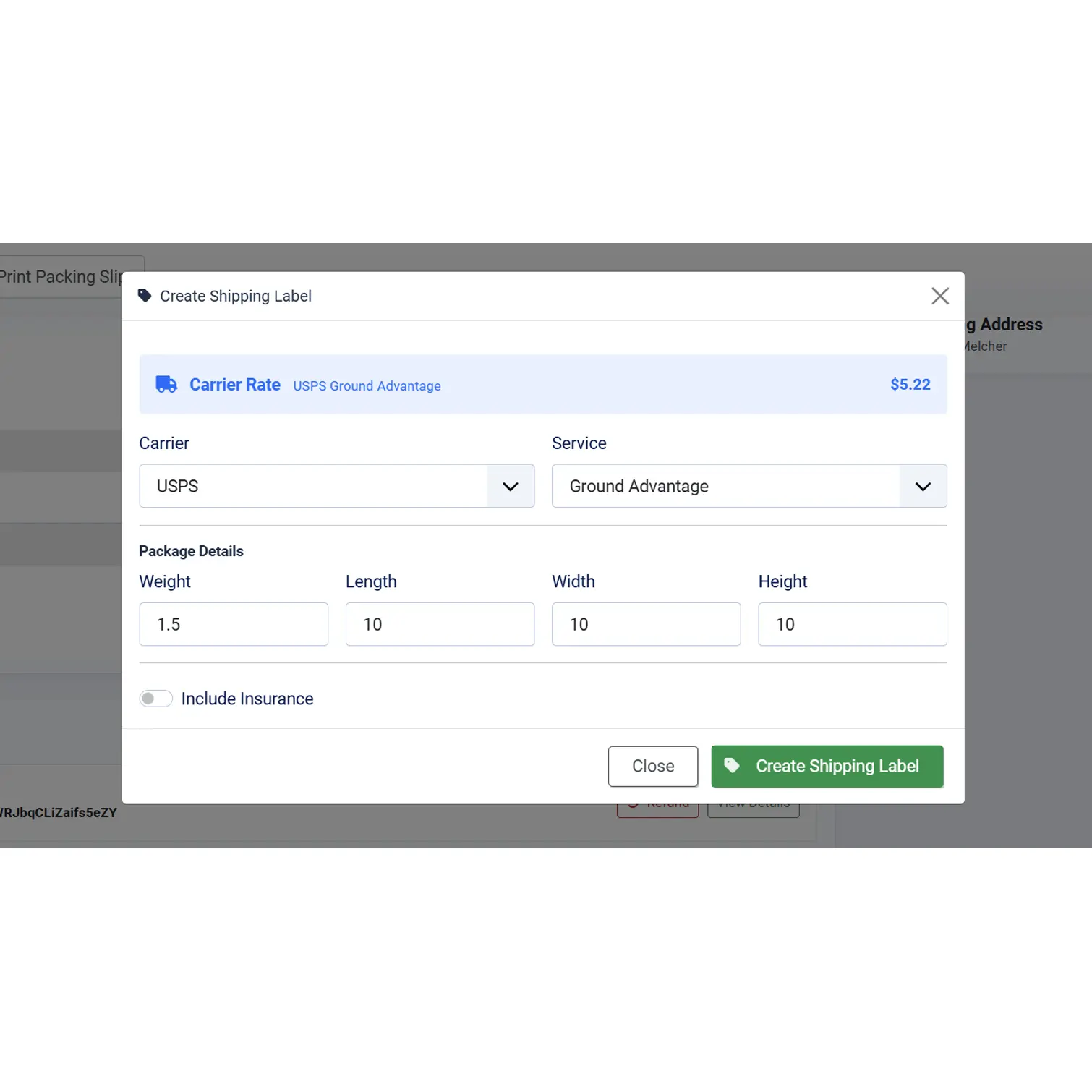
Open the order, click Create Label, enter dimensions, click Create. That's the whole workflow. The label is stored, the tracking number is posted, and the order status advances to Shipped — without you touching another tab.
Pre-Label Balance Check
Before the label modal opens, the plugin checks your AtoShip account balance against the estimated cost. If you're short, you see your balance, the estimated cost, and a link to add funds. Right now. Not after a failed label attempt.
One-Click Label Void
Wrong carrier? Wrong dimensions? Wrong order entirely? Void the label before it ships. The carrier is notified, your order record updates, and you can create a fresh label immediately. No damage done.
Return Labels
Create an inbound return label from the same order screen as the outbound label. No separate return workflow. No third-party return tool. The return label lives in your order history right next to the original.
Batch Label Creation
Select multiple orders, click Create AtoShip Labels, watch the progress bar. Up to 10 process inline. Larger batches queue automatically. Your Tuesday afternoon shipping run just got very short.
HMAC-Verified Webhooks
AtoShip pushes real-time delivery events to your Joomla store. Every incoming webhook is verified with a cryptographic signature before any order status changes. Fake payloads bounce. Legitimate deliveries get processed instantly.
Configurable Handling Fee
Add a flat-dollar or percentage handling fee on top of each live carrier rate. The carrier gets paid the real rate. The handling markup is profit — yours, quietly baked into every shipping charge your customer sees.
Geozone Restriction
Restrict AtoShip rates to the regions you actually ship to. Shoppers outside your configured zones see a different method or none at all. No international quotes for a domestic-only store. No angry emails from Honolulu.
Optional Package Insurance
Add declared-value insurance to any shipment directly from the label creation modal. One checkbox, one amount field. Done before you click Create. High-value orders covered without a separate insurance workflow.
Real-World Use Cases
Your Flat Rate Is a Lie. Fix It.
Live carrier rates. Labels in one click. Tracking that updates itself. You've been running a freight brokerage disguised as a store — time to let the plugin handle that part.
Translated In The Following Languages
Arabic Unitag (ar-AA), Chinese, Traditional (zh-TW), Danish (da-DK), Dutch (nl-NL), English (en-GB), English, USA (en-US), Finnish (fi-FI), French (fr-FR), German (de-DE), Greek (el-GR), Hebrew (he-IL), Italian (it-IT), Japanese (ja-JP), Norwegian Bokmål (nb-NO), Persian Farsi (fa-IR), Polish (pl-PL), Portuguese, Brazil (pt-BR), Portuguese, Portugal (pt-PT), Russian (ru-RU), Spanish (es-ES), Swedish (sv-SE), Turkish (tr-TR)
License Information
An active license entitles you to updates, downloads, and support for the duration of the license period. You may continue using this plugin indefinitely without an active license; however, support, updates, and downloads will not be available while your license is inactive.
- Developer J2Commerce
- J2Commerce Version 6.x
- Joomla Version 6.x
 Arabic Unitag
 Chinese, Traditional
 Danish
 Dutch
Dutch English
 English, USA
 Finnish
 French
 German
 Greek
Greek Hebrew
 Italian
 Japanese
 Norwegian Bokmål
 Persian Farsi
 Polish
 Portuguese, Brazil
 Portuguese, Portugal
 Russian
 Spanish
 Swedish
 Turkish
Fix Require a valid form token for every admin action that buys a label or records order history
Fix Limit the admin actions to users who can manage J2Commerce: viewing needs View Orders, everything else needs Edit Orders
Improvement Show a generic error message instead of the raw AtoShip API exception text
Update Requires Joomla 6.x + J2Commerce 6.x + an AtoShip account
Fix Missing sql folder in XML file
Update Requires Joomla 6.x + J2Commerce 6.x + an AtoShip account
Fix Fix AtoShip API responses read empty under the Joomla 7 framework HttpFactory
Fix Fix do not only use address id to get rates, use user id to ensure the address belongs to the user
Improvement Migrate to framework Joomla\Http\HttpFactory + PSR-7 getStatusCode()/getBody()
Update Requires Joomla 6.x + J2Commerce 6.x + an AtoShip account
Update #Casing fixed for type attribute of fields
Fix use type="Geozone" so the field loads on Linux
Fix Restore 19 bundled translations the manifest never declared (only English loaded)
New Feature Add return-label support via new label_type column on the labels table
New Feature Add Brazilian Portuguese (pt-BR) translation
New Feature Add update server for one-click Joomla updates
Update Requires Joomla 6.x + J2Commerce 6.x + an AtoShip account
Order Statuses That Update Themselves
Here is the thing about manually advancing orders to Shipped and Delivered: nobody actually does it consistently. Not when you're packing 40 boxes and the printer is jammed and someone just emailed about a refund. AtoShip Multi-Carrier Shipping for J2Commerce handles it automatically — label created means Shipped, carrier confirms delivery means Delivered. Your order list becomes a source of truth again instead of a list of stale guesses.
- Tracking number auto-posted the moment a label is created
- Order advances to Shipped automatically — no manual dropdown click
- Tracking polls on a schedule and flips the order to Delivered when confirmed
- Real-time delivery webhook fires the Delivered status the moment the carrier scans it
- Optional customer email notification when delivery is confirmed
Labels Without Leaving Your Admin — Ever
The average multi-carrier label workflow involves at least four context switches: your ecommerce admin, the carrier portal, your printer queue, back to the admin to update the order. Multiply that by every order you ship in a day and you've built a second job for yourself. AtoShip Multi-Carrier Shipping collapses the entire workflow into one screen. The label modal opens inside the order. You fill in the dimensions — pre-populated from product data. You click Create. The label is generated, stored, linked to the order, and ready to print from the same page.
- Carrier and service pre-selected from the customer's checkout choice
- Package weight pre-calculated from product data — just verify and confirm
- Balance pre-checked before the modal opens — no surprises mid-workflow
- Insurance optional — one checkbox before you create
- Carrier logo printed on the label — the one the carrier scans at pickup
You may also be interested in these products



Stay Updated
Subscribe for free and be the first to know about the latest features, updates, and new additions.