Skip to Content

New J2Commerce 6.6.5 is out. Here is everything in the release.

See What’s New
Account
Enter the email address on your account.
Forgot your username?
Enter your password.
Forgot your password?

Or continue with

Show product videos on every product page

Put YouTube, Vimeo, and your own videos on any Joomla ecommerce product page. Paste a link. Pick a layout. Watch conversion go up and returns go down.

Videos where shoppers decide

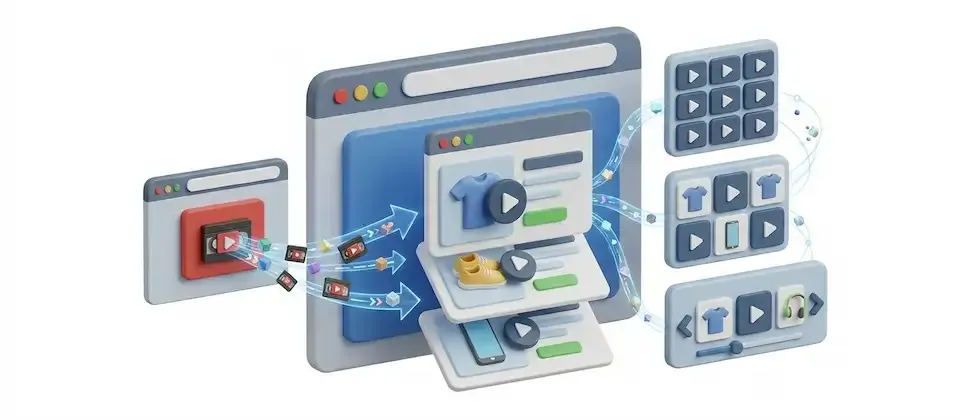
Choose from three video sources, three layouts and six page positions, and add each video by pasting a link.

  • YouTube and Vimeo Links

    Paste a YouTube or Vimeo link. The thumbnail appears automatically and the video plays in a lightbox, with no embed code or API key needed.

  • Self-Hosted Video Files

    Host your own MP4, WebM, or OGG files anywhere you like. Drop in the URL, add a custom poster image, and you have full control over your footage without depending on a third-party platform.

  • Grid Layout

    One to six columns of video thumbnails in a clean, scannable grid. Shoppers browse at a glance, click a poster, and watch in the lightbox, all without leaving the product page. Perfect for review collections and tutorial series.

  • Carousel: Autoplay, Loop, Arrows, Dots

    A swipeable carousel in Spotlight (centered hero) or Normal style. Set autoplay timing, looping, navigation arrows, pagination dots and slide spacing.

  • Alternating Layout

    Video left, text right, then flip. Video right, text left, then flip again. The zigzag editorial layout that pulls eyes down the page and gives every video its context. Narrow, equal, or wide video column, your ratio, your story.

  • Lightbox: Watch Without Leaving

    Click any video poster. The video opens in a full overlay, right on the page. Shoppers watch without leaving the product page.

  • 6 Page Positions

    Place videos in a tab, at the bottom, before or after cross-sells or below the image gallery. The video block goes where the product story needs it, not where a generic template decided years ago. Per-product overrides let every SKU get its best placement.

  • Up to 50 Videos: Drag to Reorder

    A single hero clip or a full 50-video demo library, the choice is yours. Drag to reorder the running list in seconds. First impression goes to the most important video. Every other one lines up behind it exactly where you put it.

  • Privacy-Safe Playback & Fast Loading

    YouTube videos load from the privacy-safe host, your shoppers aren't tracked by Google just for browsing your ecommerce product page. Iframes lazy-load so the page stays fast, your rankings stay intact, and the video only loads when someone actually scrolls to it.

Add a Video by Pasting a Link

The Joomla ecommerce stores that don't have product videos right now aren't missing cameras. They're missing a sane way to get footage onto the page without a developer invoice and a three-day wait. Product Videos Display is that sane way. Paste a YouTube link. Paste a Vimeo link. Drop in a URL to your own hosted video file. The plugin detects what it is and handles everything else automatically.

  • YouTube thumbnail pulled automatically, no extra step
  • Vimeo auto-detected from the pasted URL
  • Your own MP4, WebM, or OGG with a custom poster image
  • Each video gets its own caption and supporting description
  • Privacy-safe YouTube host, shoppers aren't tracked for browsing

Three Layouts to Choose From

A 3-column grid of drop-test thumbnails for phone cases. A centered autoplay carousel for your flagship coffee machine. A zigzag alternating layout for a product that needs a paragraph of context alongside every clip. Not every product has the same story. Not every product page should look the same. Pick the layout that fits the footage, or let each product override the global default and choose its own.

  • Grid: 1–6 columns of clickable poster thumbnails
  • Carousel: Spotlight or Normal, autoplay, loop, arrows, dots, spacing
  • Alternating: zigzag with Narrow, Equal, or Wide video column
  • Per-product layout overrides, no one-size-fits-all enforced
  • Every layout opens videos in the lightbox, no page-leaving

Put It Where Shoppers Actually See It

Choose from six places on the product page for the video block.

  • End of tab content, bottom of page, before/after cross-sells, below gallery, own tab
  • Sticky nav bar "Media" anchor, relabelable, sort-ordered
  • Jump link auto-hides when the product has no videos
  • Optional customizable section heading above the video block
  • Suppressed in quickview, only renders on the full product page

Launch with more today. Show every product in action tomorrow.

Every Joomla product page without a video is a shopper being asked to imagine instead of know. Stop asking them to imagine. Paste a link, pick a layout, and let your products demonstrate themselves, before your competitors figure out how to do it first.

  • YouTube and Vimeo Links
  • Self-Hosted Video Files
  • Grid Layout

Use Cases

How stores use product videos.

The Support Email That Never Gets Sent

Outdoor Gear Retailer

You sell camping equipment. The tent description says "sets up in under four minutes." But the shopper has never trusted a description that says that, and they're not starting now. They email you. They wait for a reply. They buy from someone with a YouTube video of the actual setup. You never had a chance, not because your tent is slow, but because your product page was silent.

Add one two-minute setup demo. Alternating layout: footage on the left, the step-by-step on the right. The shopper watches. The question disappears before it's asked. The tent sells. The support inbox stays quiet. You didn't change the product. You changed what the page showed.

Putting Existing Videos to Work

Artisan Food Producer

You make hot sauces. You have a YouTube channel with a chef cooking with Sauce #3, a blind tasting reaction, a production tour, a recipe tutorial, and two customer review videos. Almost nobody has watched them because almost nobody knows they exist. They live on YouTube, not on your Joomla ecommerce product page where the sale actually happens.

Paste all six links into the product page. Grid layout, three columns. Lightbox on every poster. Your product page IS now the pitch. The shopper watches the chef use it on camera, laughs at the tasting reaction, reads the recipe in the description, and adds three bottles to cart.

Forty SKUs, One Setup

Electronics Accessories Brand

You sell phone cases. Forty SKUs. Every single case has a 30-second Vimeo drop-test video proving it actually does what you claim. The problem: getting those videos onto forty Joomla product pages one at a time is a project you keep putting off. Meanwhile, the videos sit on Vimeo doing nothing.

Set the global default to carousel / Spotlight style. Every product page now gets a clean, autoplay carousel of the drop test, set once, applied everywhere. Add custom CSS scoped to the video block for a subtle border on the player. No global styles touched. No per-product setup required. Forty product pages, automatically professional, before lunch.

Languages

Translated into 21 languages.

  • Arabic Unitag ar-AA
  • Chinese, Traditional zh-TW
  • Danish da-DK
  • Dutch nl-NL
  • English (United Kingdom) en-GB
  • English (United States) en-US
  • Finnish fi-FI
  • French fr-FR
  • German de-DE
  • Greek el-GR
  • Hebrew he-IL
  • Italian it-IT
  • Japanese ja-JP
  • Norwegian Bokmål nb-NO
  • Polish pl-PL
  • Portuguese, Brazil pt-BR
  • Portuguese, Portugal pt-PT
  • Russian ru-RU
  • Spanish es-ES
  • Swedish sv-SE
  • Turkish tr-TR

Reviews

Customer Rating

No reviews yet

Every review comes from a licensed customer and appears exactly as written.

Write a Review

Log in to share your review.

Apps Works with J2Commerce 6

Product Video Display

Show YouTube, Vimeo or self-hosted videos on any product page by pasting a link and picking a layout.

Billing Option
$29.00
Every year

Item added to cart. Checkout

View Wishlist
  • Updates, downloads and support for the length of the license
  • Your plugin keeps working after the license ends, and renewing brings new updates
  • A step-by-step user guide for every setting, linked below

Joomla
Joomla 6
J2Commerce
J2Commerce 6

You May Also Like

Advanced Cart

Module J2Commerce

Give shoppers a slide-out cart drawer with a free shipping progress bar and inline coupons, so they never leave the page to see their cart.

Product Reviews

Module J2Commerce

Collect product reviews on your product pages and through post-purchase emails, then manage them all from your admin.

Customers Also Bought

J2Commerce

Show a hand-picked row of companion products with checkboxes and a live total, so shoppers add them all with one Purchase Together button.

Product Sticky Navbar

Apps J2Commerce

Add a sticky navigation bar to product pages that tracks the section being read and keeps the Add to Cart button in view.