

Skip to Content

New J2Commerce 6.6.6 is out. Here is everything in the release.

See What’s New
Account
Enter the email address on your account.
Forgot your username?
Enter your password.
Forgot your password?

Or continue with

Win New Customers With Free Gifts You Control

Gifter Pro adds a free gift to the cart when a customer qualifies, whether it is their first order, a once-only welcome or every order over a minimum spend. Limits and repeat-claim checks keep each gift going to the customers you meant it for.

  • 3

    Gift Triggers

  • 5

    Repeat-Claim Checks

  • 6

    Dashboard Counters

  • 22

    Languages

Everything a Free Gift Promotion Needs

Build a rule in the editor, point it at the right customers and watch each gift in the ledger and on the dashboard.

  • Three Gift Triggers

    Give a gift on a customer's first order, once per customer, or on every order that qualifies.

  • Automatic or Customer's Choice

    Add the gift to the cart for the customer, or let them pick one from the gifts you list.

  • Targeted Conditions

    Require products or categories, user groups, a login or a delivery zone, and give each rule its own start and end dates.

  • Minimum Spend After Discounts

    Set a minimum subtotal that is measured after coupon discounts, with or without tax.

  • Repeat-Claim Protection

    Match customers by account, email, phone, name and address, or address alone, and block each match, flag it or ignore it.

  • Stock-Aware Fallbacks

    List a fallback gift that is used when the primary gift is out of stock.

  • Limits per Order and per Customer

    Cap the free gifts on each order and for each customer, counting this app only or free items from every app.

  • Gift Ledger

    Release or void a claim, grant a gift by hand, import past free gifts and export the list as a CSV.

  • Blocked Attempts Log

    See every claim that was stopped, and set how many days the log is kept.

  • Cancel and Refund Policies

    Choose whether a failed, cancelled or refunded order frees the gift or keeps it counted.

  • Cart Messages and Layouts

    Show a progress message, a gift chooser and a Free Gift badge in Bootstrap 5 and UIkit layouts, with wording you can change.

Show Customers What They Are Still Missing

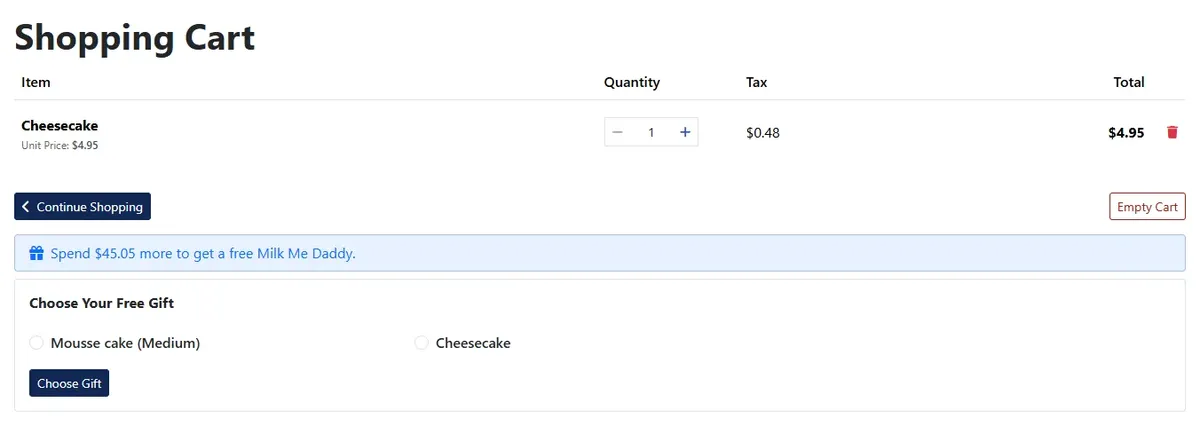
The cart tells shoppers how much more to spend to earn the gift, and offers a Choose Your Free Gift box when you let them pick. Once they qualify, the gift goes into the cart at no charge with a Free Gift badge.

  • Progress message with the amount still needed
  • Gift chooser for rules that let customers pick
  • Free Gift badge on the gift line

Aim Each Gift at the Right Cart

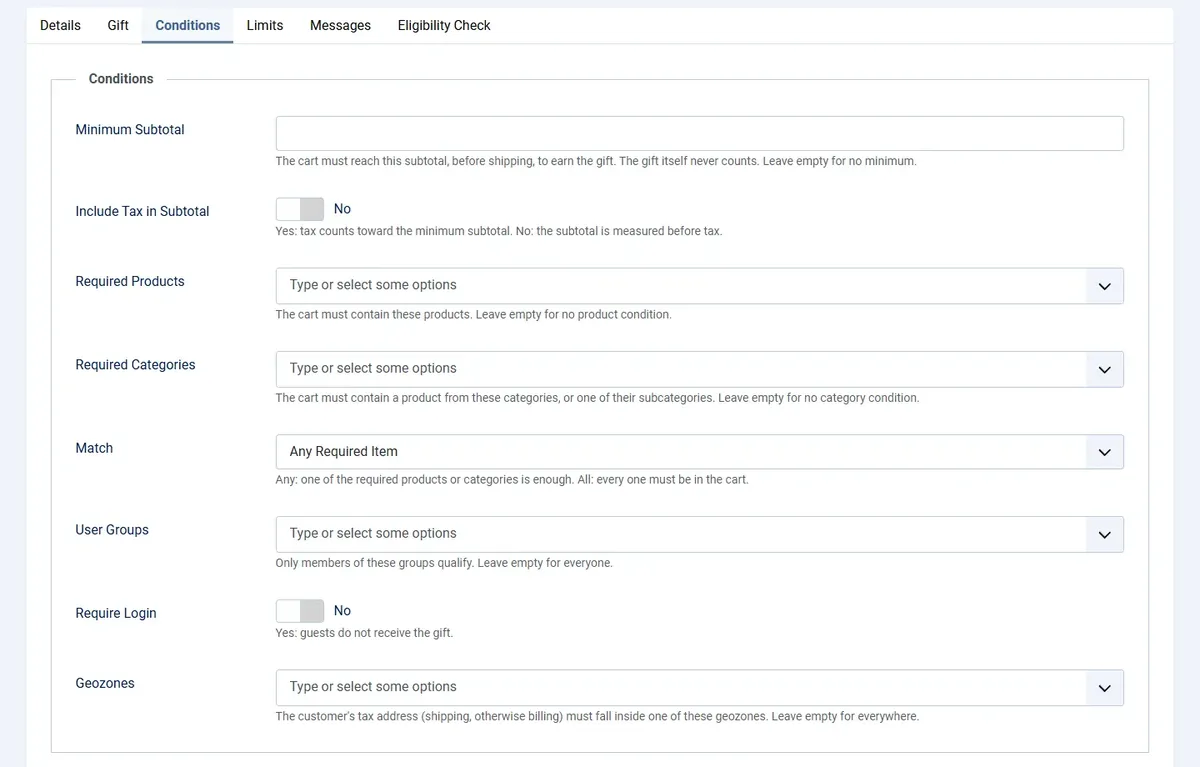
Every rule sets its own minimum subtotal, required products or categories, user groups, delivery zones and login requirement, so a gift reaches only the customers you chose.

  • Minimum spend measured after coupon discounts
  • Match any or all of the required items
  • User groups and delivery zones

Keep a Record of Every Gift

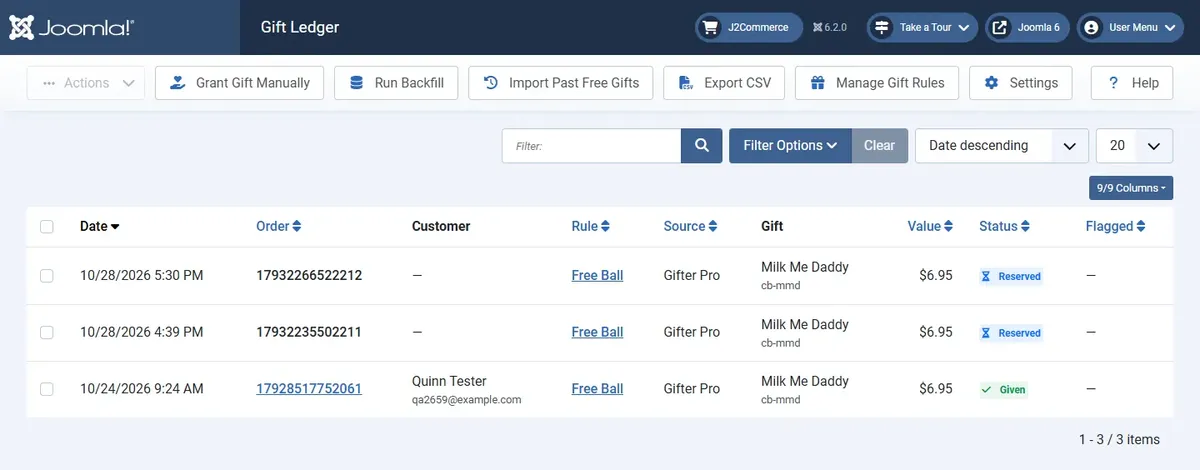
The ledger lists each gift with its order, customer, rule, value and status. Release or void a claim, grant a gift by hand, import past free gifts or export the list as a CSV.

  • Statuses for reserved, given, released, voided, manual and conflict gifts
  • Import for free gifts given before Gifter Pro
  • CSV export for your own reports

See What Your Gifts Are Doing

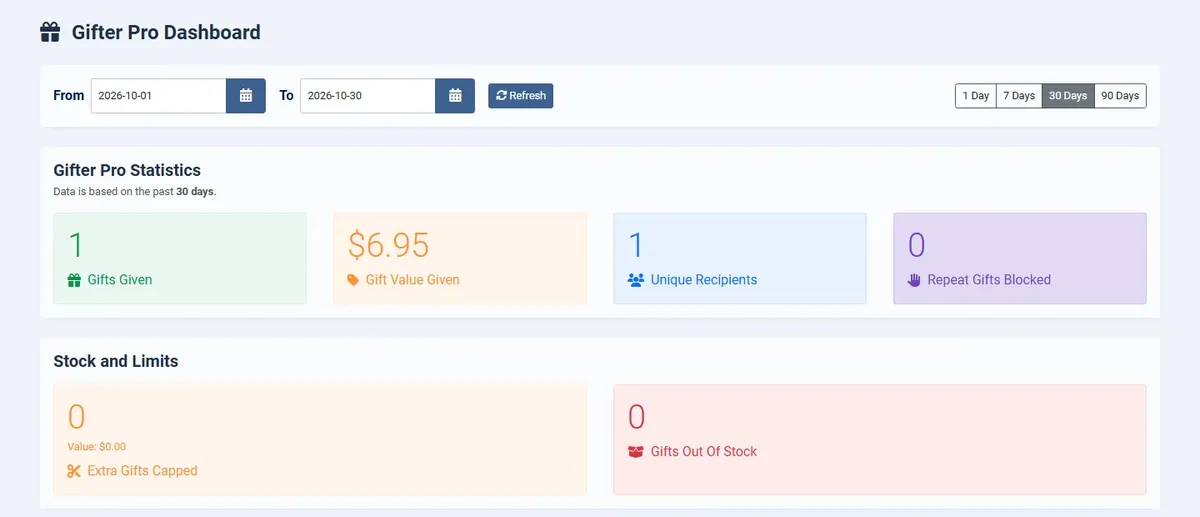
The dashboard counts gifts given, gift value, unique recipients, repeat gifts blocked, extra gifts capped and gifts out of stock, with a daily chart and your top rules.

  • 1, 7, 30 or 90 day views, or your own dates
  • Daily totals beside the chart
  • Top rules by gifts given

Give the Right Gift to the Right Customer

Create your first gift rule, check who qualifies with the Eligibility Check and let the cart do the rest.

Works with J2Commerce 6.6.4 or later on Joomla 6.

  • Three Gift Triggers
  • Automatic or Customer's Choice
  • Targeted Conditions

Use Cases

A Specialty Food Shop Welcoming New Customers

Food and Beverage Stores

A cookie shop wants every new customer to taste a second flavor. The owner creates a First Order rule with a sample box as the gift and a smaller sample as the fallback for days the box is sold out. A customer who ordered before under the same email or phone number is told the gift is for first orders and still checks out normally. New customers get a surprise in the box, regulars are not handed one by mistake, and the owner reads gift counts on the dashboard.


A Clothing Boutique Lifting Its Average Order

Apparel Stores

A boutique offers a free tote bag on every order over a minimum spend. The cart tells shoppers how much more to add, then puts the tote in the cart with a Free Gift badge once they qualify. Because the minimum is measured after coupon discounts, a coupon cannot drop a cart below the line and still win the tote. The owner limits it to one tote per order, so a large basket does not give away a pile of them.

A Wholesaler Thanking Its Trade Accounts

B2B Wholesalers

A hardware wholesaler wants to thank trade customers who buy fasteners. The rule requires products from the Fasteners category, applies only to the Trade user group and to customers in two delivery zones, and lets each buyer choose one of three gifts. A cap of one gift per customer keeps the thank-you fair, and the Gift Ledger lists who chose what, so the sales team knows which gift each account received.

A Seasonal Promotion With a Hard Stop

Stores Running Campaigns

A home goods store runs a December promotion with a free candle for each customer. The rule starts on the first of the month and ends on the last, with one gift per customer. When someone opens a second account with the same phone number, the claim is blocked and appears in the Blocked Attempts log. After the campaign the owner exports the Gift Ledger as a CSV to see what was given and to whom.

Reviews

Customer Rating

No reviews yet

Every review comes from a licensed customer and appears exactly as written.

Write a Review

Log in to share your review.

Apps Works with J2Commerce 6

Gifter Pro

Version 6.0.2 Released

Give free gifts on first orders, repeat orders or big baskets, and stop the same customer from claiming one twice.

Billing Option
$29.00
Every year

Item added to cart. Checkout

View Wishlist
  • Renews automatically when each subscription period ends. Cancel anytime in My Account.
  • Updates, downloads and support for the length of the license
  • Your plugin keeps working if you cancel renewal, and every version you downloaded stays yours

Joomla
Joomla 6
J2Commerce
J2Commerce 6

You May Also Like

Gift Card / Certificates

Apps J2Commerce

Turn any product into a gift card that is issued as a voucher and emailed to the recipient as soon as the order is paid.

Advanced Cart

Module J2Commerce

Give shoppers a slide-out cart drawer with a free shipping progress bar and inline coupons, so they never leave the page to see their cart.

Gift Wrapping

Apps J2Commerce

Offer paid or free gift wrap at checkout with a personal message field, and the wrap price shows live in the cart.

Frequently Asked Questions

Simple, downloadable, variable and flexible variable products. Subscriptions, bundles, kits, box and guided builders, grouped products and configurable products cannot be gifts.

Yes. Set a rule to Customer Chooses One and list the gifts to offer, or set it to Add Automatically and the gift goes into the cart for them. You can let customers remove an automatic gift.

Gifter Pro recognizes a returning customer by account, email, phone, name and address, or by address alone. For each check you choose Block, Flag or Off. Gmail aliases and plus-tag addresses can count as one address. Every stopped claim is recorded in the Blocked Attempts log, which is cleared after the number of days you set.

The minimum is measured after coupon discounts, and you choose whether tax counts toward it. The gift itself never adds to the total.

The rule uses the next Fallback gift you listed. You can also allow backordered gifts, and the dashboard counts the gifts that were out of stock.

You decide for failed, cancelled and refunded orders whether the gift is released, so the customer can claim it again, or stays counted. Failed and cancelled orders release it and refunded orders keep it counted until you change that.