

One Shipping Rate for a Phone Case AND a Patio Heater? That's Not Pricing. That's a Coin Flip.
Charge shipping based on what's actually in the cart. Build rate rules by product category, bill flat or per item, restrict by region, stack as many rules as an order needs. Your shipping charge finally matches your shipping cost.
Shipping Rules Built Around What You Actually Sell
No more one number trying to cover a phone case and a couch. Rate rules that know the difference — and charge accordingly.
Category-Based Rate Rules
Shipping charges based on what's actually in the cart — not one blind number slapped on every order regardless of size, weight, or fragility.
Unlimited Rate Rows
Build as many category rules as your catalog needs. One plugin, as much pricing logic as you want — no artificial row limits holding your rates hostage.
Rules Stack Automatically
Layer a flat "Fragile" handling fee with a per-item "Oversized" charge on the same order. Every matching rule fires and adds up — you never touch a calculator.
Geozone Restriction Per Rule
Charge more to ship a rocking chair to a customer six states away than across town — without duplicating your entire rate table for every region you serve.
Universal Fallback Rules
Rules with no geozone attached apply everywhere. Set one baseline rate and override only the regions that actually need something different.
Flat Handling Cost Add-On
Bake a packaging, fuel, or labor surcharge into every category-based rate — on top of the category math, applied consistently, every single time.
Shipping Tax Profile
Apply the right tax to the shipping charge itself, matched to the customer's location — no manual tax math on freight after the fact.
Custom Checkout Label + Logo
Your customer sees a shipping method that looks like it belongs to your store — branded name, branded logo, not a generic system default.
Clean Admin Rule-Builder UI
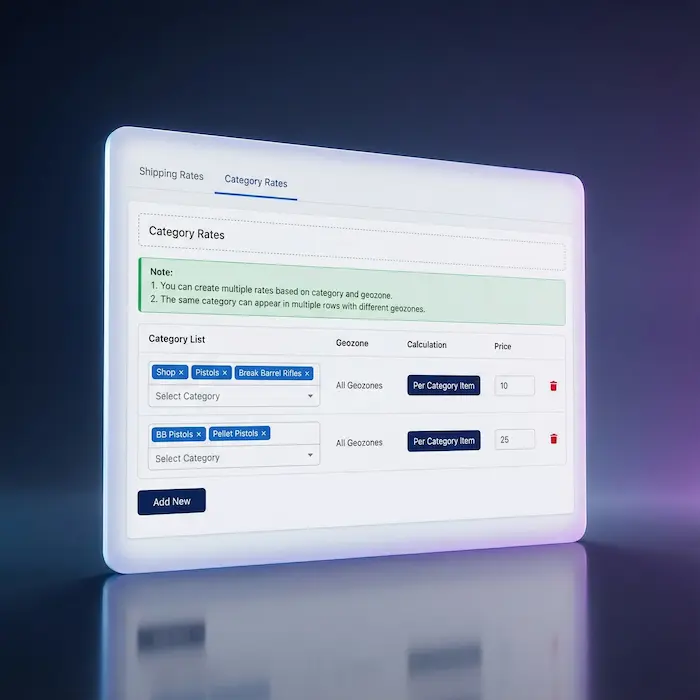
Manage every category, geozone, and price from one screen — no spreadsheet, no second plugin, no developer ticket needed to add or adjust a rate.
Bill It the Way the Cost Actually Works
Some categories cost you the same to ship no matter how many units go in the box — a flat "Fragile Handling" fee makes sense whether it's one vase or four. Other categories scale directly with quantity — three armchairs genuinely cost more to move than one. Category Based Shipping gives you both billing modes, chosen per rule, so a quantity-driven cost never gets forced into a flat fee and a flat cost never gets multiplied by accident.
- Per Category — one flat charge the moment anything from that category is in the cart
- Per Item — price multiplied by the number of matching items in the order
- Choose the mode per rule — mix and match across your whole catalog
- No forced one-size-fits-all calculation across categories that behave differently
Complex Carts Get Complex — and Correct — Pricing
A customer buying a glass ornament and an oversized gift basket in the same order used to get whichever flat rate the store happened to pick — usually wrong for one of the two. With Category Based Shipping, every matching rule fires on that order and adds together automatically. Stack a flat fragile-handling fee with a per-item bulky surcharge without writing a single formula. Then restrict any rule to the regions where the extra cost actually applies, and let a rule with no region attached quietly cover everywhere else.
- Multiple category rules combine on a single order automatically
- Geozone-restricted rules charge more only where distance actually costs more
- Universal fallback rules cover every region you didn't specifically target
- Debug logging shows exactly which rules fired and why, when you need to check
Real-World Use Cases
Stop Averaging Your Shipping. Start Charging What It Costs.
Your catalog isn't one product. Your shipping charge shouldn't pretend it is either. Simple math.
Translated In The Following Languages
Arabic Unitag (ar-AA), Chinese, Traditional (zh-TW), Danish (da-DK), Dutch (nl-NL), English (en-GB), English, USA (en-US), Finnish (fi-FI), French (fr-FR), German (de-DE), Greek (el-GR), Hebrew (he-IL), Italian (it-IT), Japanese (ja-JP), Norwegian Bokmål (nb-NO), Persian Farsi (fa-IR), Polish (pl-PL), Portuguese, Brazil (pt-BR), Portuguese, Portugal (pt-PT), Russian (ru-RU), Spanish (es-ES), Swedish (sv-SE), Turkish (tr-TR)
License Information
An active license entitles you to updates, downloads, and support for the duration of the license period. You may continue using this plugin indefinitely without an active license; however, support, updates, and downloads will not be available while your license is inactive.
- Developer J2Commerce
- Extension Type Shipping
- J2Commerce Version 4.x, 6.x
- Joomla Version 4.x, 5.x, 6.x
 Arabic Unitag
 Chinese, Traditional
 Danish
 Dutch
Dutch English
 English, USA
 Finnish
 French
 German
 Greek
Greek Hebrew
 Italian
 Japanese
 Norwegian Bokmål
 Persian Farsi
 Polish
 Portuguese, Brazil
 Portuguese, Portugal
 Russian
 Spanish
 Swedish
 Turkish
Fix Fix do not only use address id to get rates, use user id to ensure the address belongs to the user
Update Requires Joomla 6.x + J2Commerce 6.x
New Feature Category Based Shipping plugin — per-category or per-item rates scoped by geozone
New Feature Per-row rate editor with multi-category select, geozone, calculation type, and price
New Feature Optional handling fee and shipping tax class per method
New Feature Translatable checkout method name with "General Shipping" placeholder fallback
New Feature Full localization in 20 languages
Fix Fix checkout SQL error 1054 from wrong address column (postal_code to zip)
Fix Fix shipping method missing at checkout due to flattened cart-item shape
Fix Fix undefined variable warning in the category multi-select field
Update Requires Joomla 6.x + J2Commerce 6.x
Fix Fixed Geozone selection in rates list (not working properly)
Fix Image Update in media folder
New Feature J2Commerce v4 and Joomla 4/5 support
The Honest Summary
Category Based Shipping is a Joomla ecommerce shipping plugin that charges different rates based on product categories. You can set flat rates per category or per-item rates. You can vary rates by customer location using geozones. It integrates with your existing J2Commerce tax setup.
It's not fancy. It's not complicated. It's not trying to be everything to everyone.
It's just category-based shipping that works.
- Ship different categories at different rates without creating multiple shipping methods
- Per Category (flat) or Per Item calculation options
- Geozone support for geographic rate variations
- Uses your existing Joomla category structure
- Tax class integration for shipping taxes
For your Joomla store. Running J2Commerce. Selling things in categories that ship differently.
That's all. And that's enough.
You may also be interested in these products




Stay Updated
Subscribe for free and be the first to know about the latest features, updates, and new additions.