

Stop Sending Invoices By Hand.
Every order confirmation email goes out with a branded PDF invoice already attached. No template. No copy-paste. No 11pm paperwork session. Just orders — with invoices.
Everything Your Invoices Were Missing
From automatic email attachment to customer self-download to B2B template filtering — the complete invoice automation stack for your Joomla ecommerce store.
Auto-Attach to Order Emails
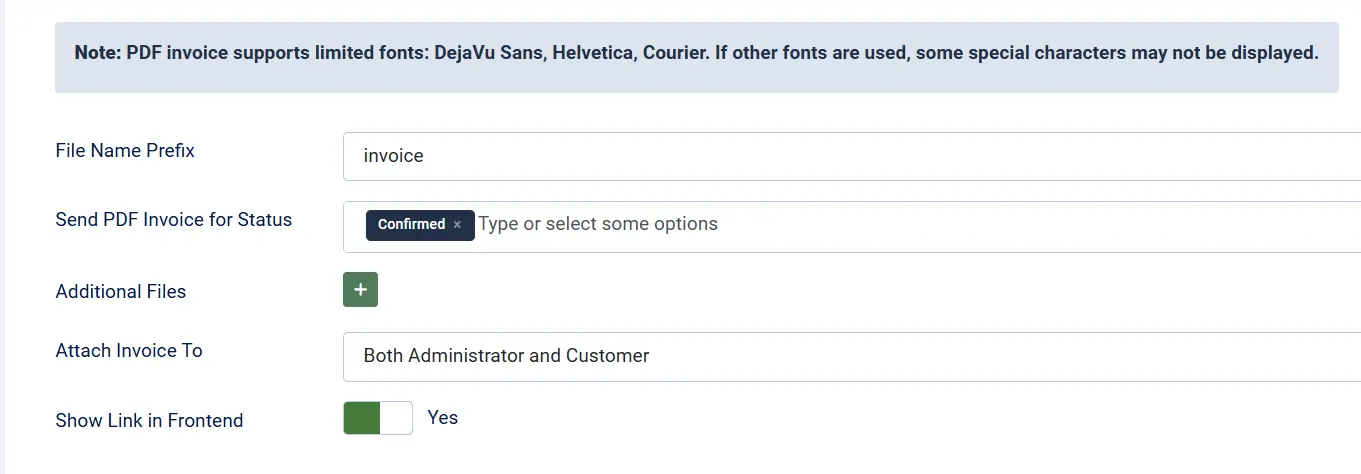
Every confirmation email goes out with the PDF already in it. Customer only, admin only, or both. You configure it once and then you stop thinking about it entirely.
Conditional by Order Status
Only trigger invoice generation on the statuses that matter — confirmed, paid, shipped. Pending and failed orders stay quiet. Customers only receive invoices for real transactions.
Customer Self-Download
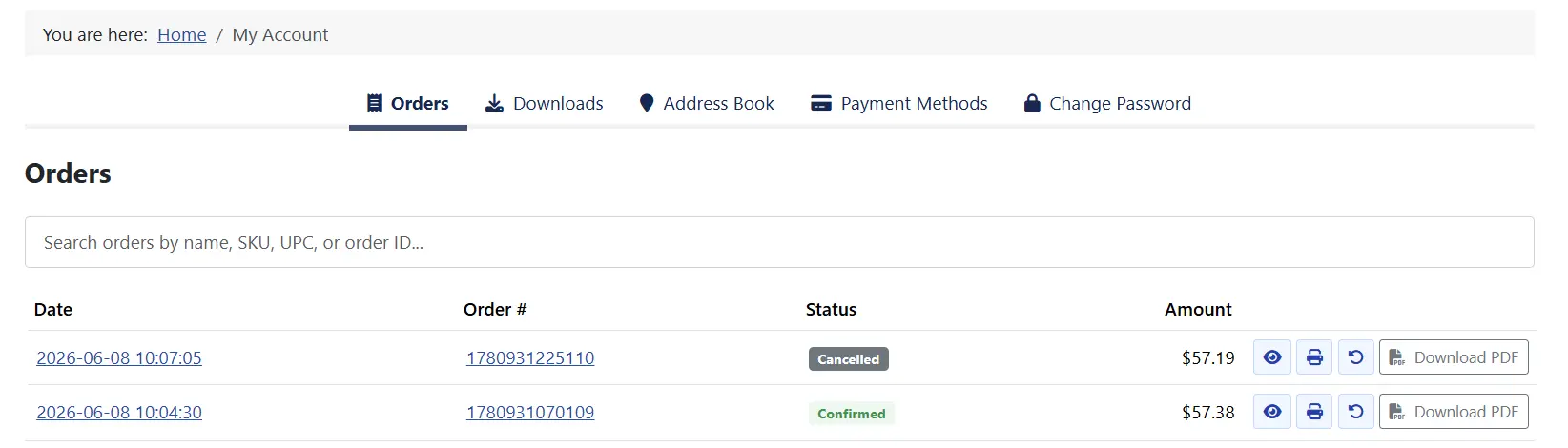
Customers find their invoice in their order history and download it themselves. They stop emailing you for it. Your support inbox stops being a filing cabinet.
Admin One-Click Download
Open any order in the admin panel. There's an invoice download card waiting. Click it. PDF lands in your browser. Tax season, audits, accountant calls — handled in seconds.
Multi-Language Template Matching
French customers get French invoices. German customers get German invoices. The right template is selected automatically based on the customer's registered language — no sorting required.
Branded PDF Output
Custom CSS, custom fonts, your logo embedded directly in the file. The invoice looks like your business — not a generic receipt. Images travel inside the PDF so your branding renders everywhere.
Four-Way Template Filtering
Filter invoice templates by order status, payment method, customer group, and language. Wholesale buyers see one layout; retail customers see another. Automatically. Every time.
Secure by Design
PDFs live in a protected server directory. Customers download only their own invoices — ownership is verified against the logged-in account. Download links are token-validated. No guessable URLs.
Additional File Attachments
Need to include terms and conditions, a compliance certificate, or an installation guide? Upload any PDF and attach it alongside the invoice on every qualifying order email.
Real-World Use Cases
Your Invoices Should Be Running Themselves.
Every order your Joomla ecommerce store processes today will eventually need a paper trail. Set it up once. Let it run. Get your evenings back.
Translated In The Following Languages
Arabic Unitag (ar-AA), Chinese, Traditional (zh-TW), Danish (da-DK), Dutch (nl-NL), English (en-GB), English, USA (en-US), Finnish (fi-FI), French (fr-FR), German (de-DE), Greek (el-GR), Hebrew (he-IL), Italian (it-IT), Japanese (ja-JP), Norwegian Bokmål (nb-NO), Persian Farsi (fa-IR), Polish (pl-PL), Portuguese, Brazil (pt-BR), Portuguese, Portugal (pt-PT), Russian (ru-RU), Spanish (es-ES), Swedish (sv-SE), Turkish (tr-TR)
License Information
An active license entitles you to updates, downloads, and support for the duration of the license period. You may continue using this plugin indefinitely without an active license; however, support, updates, and downloads will not be available while your license is inactive.
- Developer J2Commerce
- Extension Type Apps
- J2Commerce Version 4.x, 6.x
- Joomla Version 4.x, 5.x, 6.x
 Arabic Unitag
 Chinese, Traditional
 Danish
 Dutch
Dutch English
 English, USA
 Finnish
 French
 German
 Greek
Greek Hebrew
 Italian
 Japanese
 Norwegian Bokmål
 Persian Farsi
 Polish
 Portuguese, Brazil
 Portuguese, Portugal
 Russian
 Spanish
 Swedish
 Turkish
Fix Casing fixed for type attribute of fields
Improvement Additional file attachments now use the Joomla Media Manager (multiple files supported). Existing attachment values are not migrated automatically.
New Feature 13 language files updated.
New Feature J2Commerce v6 and Joomla 6 support
Update J2Store v4 and Joomla 4/5 plugin support
The Invoice That Shows Up Before the Customer Asks
Every order notification email your Joomla ecommerce store sends can carry a PDF invoice — automatically generated, correctly named, and attached without any manual step. You set the trigger statuses once. After that, every qualifying order handles its own paperwork.
- Route to customer, admin, or both — your choice per configuration
- Generated fresh from live order data every time
- One PDF generated per order, cached across multiple email recipients
- Attach additional PDFs — terms, certificates, guides — alongside the invoice
The Right Invoice for the Right Buyer, Every Time
B2B ecommerce runs on precise paperwork. Different buyers need different invoice formats — trade accounts need VAT breakdowns, retail customers want a simple receipt, and your international buyers need their language. Four-dimensional template filtering handles all of it without manual routing.
- Filter by order status — only confirmed, paid, or shipped orders get invoiced
- Filter by payment method — bank transfer orders look different from card orders
- Filter by customer group — wholesale and retail accounts get distinct layouts
- Filter by language — the invoice matches the customer's registered language automatically
You may also be interested in these products


Stay Updated
Subscribe for free and be the first to know about the latest features, updates, and new additions.